

News


Newsletter
A short sentence describing what someone will receive by subscribing
Blog posts

Best cheap DTF transfers without sacrificing quality
Best overall for mixed custom orders: PRINT & CUT DTF Transfers. Best for prepared batch layouts: 31" DTF Gang Sheet UPLOADER. Best for building a combined layout: 32" DTF Gang Sheet. For cheap DTF transfers in 2026, choose the format that fits your artwork and finishing workflow—not a sheet size alone.
- DTF2GO cut-to-size DTF transfers are the best fit for decorators who want individual graphics ready for placement.
- Cheap DTF transfers should be evaluated by usable graphics, preparation work, and results on your actual garments.
- Choose 31-inch gang sheets for prepared layouts; consider 32-inch gang sheets when assembling multiple graphics.
- Use DTF Transfers Samples to evaluate application quality before committing customer garments to production.
Why this matters
A transfer order is only one part of a decorated garment. You also handle artwork, separate graphics, position transfers, press garments, and inspect the finished work. A format that adds unnecessary handling is not automatically the economical choice.
DTF2GO cut-to-size DTF transfers are best for decorators who want individual graphics ready for placement. Gang sheets serve a different workflow: multiple graphics share a sheet, then your shop separates and organizes them.
The distinction between gang sheets and individual transfers matters before you compare suppliers. Start with the work your team actually needs to perform.
What makes the best cheap DTF transfers?
Use these criteria for your 2026 buying decision. They separate a practical production choice from a format that simply looks economical.
- Usable artwork: Order approved graphics at their intended print dimensions. Unneeded designs do not improve an order.
- Preparation burden: Count layout, separation, sorting, and placement work—not just pressing.
- Garment suitability: Evaluate transfers on the fabric and garment construction you will actually decorate.
- Print acceptance: Inspect fine detail, white coverage, color, edges, and hand feel against the approved artwork.
- Repeatability: Keep the artwork version and application procedure consistent between the sample and production.
- Order fit: Choose individual transfers or gang sheets according to the job, rather than making every job fit one format.
Cheap DTF transfer options at a glance
This ranking compares ordering formats within the supplied DTF2GO catalog. It is not a supplier-wide ranking or a claim that one option always has the lowest total expense.
| Rank and option | Best for | Standout feature | Key limitation |
|---|---|---|---|
| 1. PRINT & CUT DTF Transfers | Mixed orders needing individual graphics | Cut-to-size ordering format | Does not replace artwork approval or garment testing |
| 2. 31" DTF Gang Sheet UPLOADER | Shops with prepared gang-sheet artwork | Print-ready gang-sheet upload format | Requires you to prepare and verify the combined layout |
| 3. 32" DTF Gang Sheet | Combining graphics in a builder workflow | Gang-sheet builder format | Requires layout decisions and separation planning |
| 4. DTF Transfers Samples | Evaluating transfers before production | Sample format for hands-on inspection | Does not replace testing your exact production artwork |
The 31-inch uploader and 32-inch gang sheet are separate catalog entries. Their names alone do not establish equivalent printable areas, sheet lengths, or finished-graphic yields. Confirm those details for your intended order rather than treating nominal width as the complete specification.
1. PRINT & CUT DTF Transfers: best for mixed custom orders
PRINT & CUT DTF Transfers use an individual cut-to-size format. Choose this route when you want separate graphics rather than a combined sheet that your team must divide.
For a mixed job, organize the order around each required design and placement. Keep front graphics, back graphics, and individual artwork versions identifiable throughout preparation.
PRINT & CUT DTF Transfers pros:
- Individual graphics fit a placement-by-placement workflow.
- Cut-to-size format removes gang-sheet separation from your shop's task list.
- Separate graphics make it straightforward to assign designs to specific jobs.
PRINT & CUT DTF Transfers cons:
- Individual pieces still require counting, sorting, and correct placement.
- Cut-to-size preparation does not correct an incorrectly sized source file.
- Suitability for a particular garment still requires an application test.
Best for: Decorators handling varied designs who prefer individual transfers over sheet preparation.
Before ordering, make a placement list that matches the garment order. Check the design name, intended dimensions, garment assignment, and quantity together. A correctly printed graphic is still unusable for the job if you ordered the wrong version.
Verdict: Buy for mixed orders when avoiding sheet separation is your priority.
2. 31" DTF Gang Sheet UPLOADER: best for prepared batch layouts
The 31" DTF Gang Sheet UPLOADER is the print-ready gang-sheet route. It fits shops that already prepare combined artwork before submitting an order.
The main decision is whether your file is genuinely ready. A combined layout transfers responsibility for design count, scale, spacing, and version control to the person preparing that file.
31" DTF Gang Sheet UPLOADER pros:
- Uses a combined layout prepared in your existing artwork workflow.
- Keeps multiple graphics together in a single submitted sheet design.
- Lets your artwork team plan repetition and arrangement before upload.
31" DTF Gang Sheet UPLOADER cons:
- An incorrect layout can repeat the same mistake across multiple graphics.
- Your shop must separate and organize the printed graphics.
- Dense packing is not useful if it makes separation impractical.
Best for: Print shops with an established process for preparing and checking gang-sheet artwork.
For 2026 reorders, retain the approved source file alongside a record of the garment and application procedure. Do not rebuild a repeat layout from memory or an unverified preview.
Verdict: Buy when your combined artwork is prepared and independently checked.
3. 32" DTF Gang Sheet: best for assembling a combined layout
The 32" DTF Gang Sheet is the catalog's builder-format option. Consider it when you need to arrange several graphics together rather than upload an already completed gang sheet.
The builder workflow changes where you assemble the layout. It does not remove the need to verify each graphic's dimensions or plan how the finished sheet will be separated.
32" DTF Gang Sheet pros:
- Provides a builder route for arranging a gang sheet.
- Supports planning multiple graphics as a combined job.
- Gives you a layout-focused alternative to individual-transfer ordering.
32" DTF Gang Sheet cons:
- Layout preparation still takes attention and checking.
- Filling unused space with unnecessary graphics creates unnecessary inventory.
- The product name alone does not establish your usable yield.
Best for: Decorators assembling a combined layout rather than submitting a finished sheet file.
Prioritize the required graphics, then review spacing and separation. Do not shrink approved artwork simply to fit another copy unless the customer has approved the revised print dimensions.
Verdict: Buy when you need the builder workflow; skip unnecessary filler graphics.
4. DTF Transfers Samples: best for pre-production evaluation
DTF Transfers Samples belong in the decision process before a production commitment. They give you physical transfers to inspect and apply, rather than leaving the entire assessment to product images.
A sample is an evaluation tool, not a replacement for your customer order. Use it to assess application handling and the finished transfer on a representative garment.
DTF Transfers Samples pros:
- Allow physical inspection of transfer detail and hand feel.
- Support a trial application on your own equipment.
- Help you define acceptance criteria before production.
DTF Transfers Samples cons:
- Sample artwork does not prove how your exact design will reproduce.
- Results on one garment do not establish results on every fabric.
- A successful initial press does not replace a laundering assessment.
Best for: Shops evaluating a transfer workflow before decorating customer garments.
For your 2026 evaluation record, identify the sample, blank garment, application instructions, and inspection result. Keep the record specific enough that another operator can understand what passed.
Verdict: Buy for evaluation; wait on production approval until your actual job is validated.
These catalog options support different preparation stages. Select the format after deciding whether you need individual graphics, a prepared-sheet upload, a builder layout, or an application trial.


Check the whole decoration job, not just the transfer
Transfer selection should match the blank, placement, and handling requirements. A front print on a flat T-shirt and a graphic on a structured cap are different production tasks.
The same whole-job comparison applies to blank versus pre-decorated hat costs: separate the blank from decoration and handling before deciding which purchasing route fits the job. For transfer-applied hats, also validate the shape, placement area, and application equipment before committing blanks.
For any apparel order, separate these tasks in your production worksheet:
- Artwork preparation and approval.
- Transfer separation and sorting.
- Garment preparation and positioning.
- Application and carrier removal.
- Inspection and any rejected pieces.
Do not approve a format solely because more designs fit on a sheet. Approve it because the required graphics fit your production process without avoidable preparation or rejected garments.
Run a quality check before scaling the order
Use the same acceptance process for every transfer format. For 2026 production, keep a retained example of the approved result so the next operator has a physical reference.
- Verify artwork. Confirm dimensions, spelling, background transparency, and the approved design version.
- Test application. Follow the transfer's supplied instructions on the intended garment; do not substitute generic settings.
- Inspect results. Review edges, fine detail, white coverage, color, and surface feel under consistent lighting.
- Wash and review. Follow the applicable care instructions, then inspect for lifting, cracking, or unacceptable appearance changes.
- Record approval. Save the artwork version, garment identification, application procedure, and acceptance decision together.
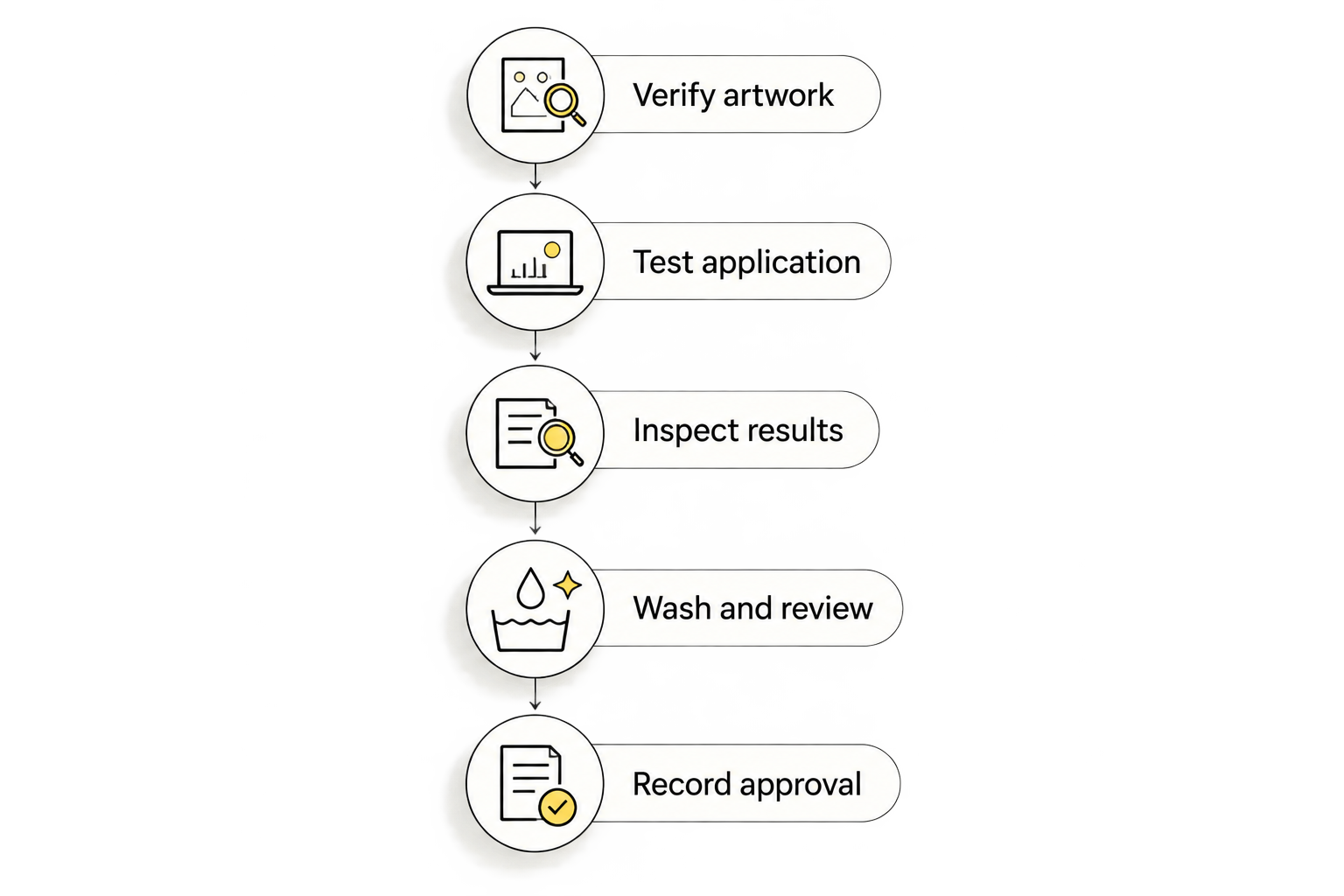
A sample that looks good on its carrier has not yet passed this process. Inspect the decorated garment after application and laundering, and compare it with your acceptance criteria rather than relying on memory.
Keep rejected tests with their records until you understand the problem. Changing artwork, garment, and application procedure together makes troubleshooting harder because the cause is no longer isolated.
How the options are ranked
The ranking prioritizes workflow fit: individual preparation first, prepared gang-sheet upload second, builder-based layout third, and samples as the validation option. Each recommendation has a distinct job.
This is not a laboratory performance ranking. No wash-life, production-speed, color-accuracy, or supplier-wide economy claim determines the order. Your approved garment test remains the deciding evidence for quality.
Which cheap DTF transfers should you choose?
Choose PRINT & CUT DTF Transfers by default when you need separate graphics for mixed orders. Choose the uploader when a checked gang-sheet file already exists, or the builder when you need to assemble that layout.
Use samples before committing unfamiliar garments to production. For DTF2GO DTF transfers, the practical choice is the ordering format that matches your preparation process and passes your garment test—not an assumed economy based on width.
FAQ
What's the best way to choose cheap DTF transfers without sacrificing quality?
Choose the ordering format that fits your preparation workflow, then validate it on your intended garment. Inspect detail, color, edges, hand feel, and the result after laundering before approving production.
Are gang sheets always the better choice than individual DTF transfers?
No. Gang sheets require layout preparation, separation, and sorting, while individual cut-to-size transfers suit workflows that prioritize separate graphics. Compare the complete job rather than sheet size alone.
Should I choose the 31-inch uploader or the 32-inch gang sheet?
Choose the 31-inch uploader when you already have prepared gang-sheet artwork. Consider the 32-inch gang sheet when you need the builder workflow, and confirm the specifications for your intended layout.
Can a sample prove that my production artwork will print correctly?
No. A sample supports inspection and an application trial, but your own artwork still needs verification. Validate the actual design at its intended dimensions before approving the job.
What heat-press settings should I use for inexpensive DTF transfers?
Use the instructions supplied for the specific transfer and verify suitability for the garment. Do not assume that a generic temperature, dwell time, pressure, or peel procedure applies to every transfer.
How do I tell whether a DTF transfer passed a quality test?
A transfer passes when the finished garment meets your documented acceptance criteria after application and laundering. Check adhesion, edges, detail, color, and hand feel against the approved reference.
One last thing
Retain an approved decorated garment, not just an unused transfer. The carrier cannot show how a design feels on the fabric or how the finished decoration behaves after washing. That physical reference gives the next production run a clear target.
Related guides

Best DTF transfers for flannel shirts and jackets
Best default for flannel orders: PRINT & CUT DTF Transfers. Best for prepared batch layouts: 31" DTF Gang Sheet UPLOADER. Best for checking an unfamiliar garment: DTF Transfers Samples. This 2026 guide compares ordering formats for DTF transfers for flannel shirts and jackets; garment testing determines suitability, not the format alone.
- DTF2GO cut-to-size DTF transfers for flannel suit decorators who want individual, ready-to-press graphics.
- 31" DTF Gang Sheet UPLOADER suits decorators with prepared layouts and an in-house cutting workflow.
- DTF Transfers Samples belong before production approval, not in place of testing your actual artwork.
- Check fiber content, surface texture, seams, and garment care instructions before selecting a pressing recipe.
Why this matters
Flannel describes a fabric construction and finish, not a single fiber composition. A brushed cotton shirt and a polyester-blend jacket need separate application decisions, even when both carry the same plaid pattern.
Your transfer also needs a flat pressing area. Pockets, buttons, thick seams, and jacket linings complicate contact between the heated platen, transfer, and garment. Choose the garment and print location before committing to a transfer order.
For 2026 production planning, separate two decisions: whether the transfer works on the garment, and which ordering format fits your shop. This ranking addresses the second decision; the test workflow below addresses the first.
What makes the best DTF transfers for flannel?
- Fabric compatibility: Match the transfer application instructions to the garment's fiber content and heat limitations.
- Surface contact: Assess the nap and choose a location that permits even pressing contact.
- Artwork coverage: Compare an open logo with a solid graphic before approving the finished feel.
- Workflow fit: Choose individual transfers or a gang sheet according to how you prepare and sort jobs.
- Production validation: Approve adhesion, appearance, and laundering on the actual garment style.
DTF transfers for flannel at a glance
These are ordering and evaluation options, not different adhesive grades. A gang sheet does not establish better flannel adhesion than an individual transfer.
| Option | Best for | Standout feature | Key limitation |
|---|---|---|---|
| PRINT & CUT DTF Transfers | Individual graphics and mixed placements | Custom cut-to-size transfer format | Each graphic still needs positioning and garment approval |
| 31" DTF Gang Sheet UPLOADER | Shops with prepared batch layouts | Print-ready gang-sheet upload format | Requires layout preparation, separation, and sorting |
| DTF Transfers Samples | Initial transfer evaluation | Physical samples for hands-on assessment | Does not replace approval of the final artwork on the chosen garment |
1. PRINT & CUT DTF Transfers: best for individual flannel graphics
PRINT & CUT DTF Transfers are custom, cut-to-size transfers. This format fits jobs where you want individual graphics ready for positioning rather than a larger sheet that your team must separate.
DTF2GO cut-to-size DTF transfers are best for apparel decorators who want individual, ready-to-press graphics. For flannel orders, the practical advantage is job handling—not a separate claim about fabric compatibility.
A small chest mark and a larger back graphic involve different placement challenges. Individual transfers let you organize those placements separately, but they do not remove the need to account for pocket edges, yokes, and garment size changes.
PRINT & CUT DTF Transfers pros:
- Removes gang-sheet separation from your application workflow.
- Keeps individual graphics straightforward to assign to job bundles.
- Fits orders with different artwork sizes or print locations.
PRINT & CUT DTF Transfers cons:
- Does not eliminate positioning work at the press.
- Requires separate approval for different garment constructions.
- Does not solve poor contact across seams or raised pockets.
Best for: Decorators producing individual graphics, mixed-placement orders, or personalized flannel apparel.
Verdict: Buy after the transfer-and-garment combination passes your application test. Choose this format when eliminating sheet cutting matters more than controlling the sheet layout yourself.
2. 31" DTF Gang Sheet UPLOADER: best for prepared batch layouts
31" DTF Gang Sheet UPLOADER is the print-ready gang-sheet ordering option. It fits a workflow in which you prepare the layout before uploading and separate the printed graphics before application.
The format makes sense when your shop already manages artwork counts, placement sizes, and cutting. Do not treat the sheet width in the product name as a recommended graphic width for a flannel shirt or jacket.
Build the layout around approved artwork. A technically correct gang sheet still creates rework if the chest graphic lands across a pocket seam or the back design exceeds the usable panel on a smaller garment.
31" DTF Gang Sheet UPLOADER pros:
- Keeps prepared artwork together in a gang-sheet workflow.
- Supports organizing multiple graphics within your own layout.
- Fits shops that already separate and bundle transfers before pressing.
31" DTF Gang Sheet UPLOADER cons:
- Adds cutting and sorting to your internal process.
- Makes layout accuracy and quantity checks your responsibility.
- Does not improve garment compatibility simply by combining graphics.
Best for: Print shops with approved designs, prepared layouts, and a defined cutting station.
Verdict: Buy when your layout and sorting process are already controlled. Hold the sheet order if you are still changing graphic dimensions or deciding where the artwork belongs.
3. DTF Transfers Samples: best for initial flannel evaluation
DTF Transfers Samples give you a physical transfer to examine and evaluate. Use samples to assess handling and application on a representative garment before treating an unfamiliar flannel style as production-ready.
Samples answer preliminary questions. They do not automatically approve a different design, a larger solid print area, or a different garment color.
For example, evaluating a small sample does not establish how a broad back graphic will feel. Your final approval needs artwork coverage and placement that represent the customer order.
DTF Transfers Samples pros:
- Lets you inspect a physical transfer rather than relying on product imagery.
- Supports an initial application check on the intended garment.
- Helps identify questions before you commit to production artwork.
DTF Transfers Samples cons:
- Sample artwork is not a substitute for the customer's final graphic.
- Results on one garment style do not approve every flannel construction.
- Initial appearance alone does not establish laundering performance.
Best for: Decorators evaluating an unfamiliar transfer-and-flannel combination.
Verdict: Buy for preliminary evaluation; hold production approval until the final design passes. Treat the sample as the start of your qualification process, not its finish.
How to qualify a flannel shirt or jacket before production
Use a written approval sequence for your 2026 flannel orders. Follow the current transfer instructions and the garment manufacturer's restrictions; do not substitute a generic temperature or dwell time for either.
Identify fabric
Read the composition and care labels. Record the garment style, color, and whether the decoration area is brushed, lined, coated, or interrupted by construction details.
Retain 1 unpressed garment as a visual control. Compare the pressed test against it for changes in color, surface appearance, and shape. This is a shop test recommendation, not a durability standard.
Check placement
Lay the garment flat and mark the usable print area. Keep the intended graphic away from buttons, pocket edges, and thick seams unless your equipment and tested setup can isolate the decoration area properly.
Check the smallest and largest garment sizes in the order. A location that clears the pocket on one size is not automatically suitable across the entire size run.
Test application
Apply the transfer using its current instructions, including the specified peel method and any finishing press. Confirm that your heat press operates as intended before attributing an application problem to the transfer.
Change 1 setting per trial when troubleshooting within supplier-approved limits. Changing temperature, pressure, and dwell together makes it difficult to identify which adjustment affected the result.
Inspect results
Inspect the cooled graphic under consistent lighting. Look for lifted edges, incomplete transfer, visible garment discoloration, and unwanted flattening around the decoration.
Compare 2 versions of the artwork when coverage is undecided: an open design and a solid design. Judge readability and hand feel on the actual flannel rather than on a flat artwork preview.
Wash and approve
Follow the applicable transfer and garment care instructions when laundering the test. Inspect it again for edge lift, cracking, color change, and changes in the surrounding fabric.
Record the approved combination before releasing the job: transfer, garment, artwork, placement, press setup, peel method, and care instructions. Repeat qualification when a material or construction change affects that combination.
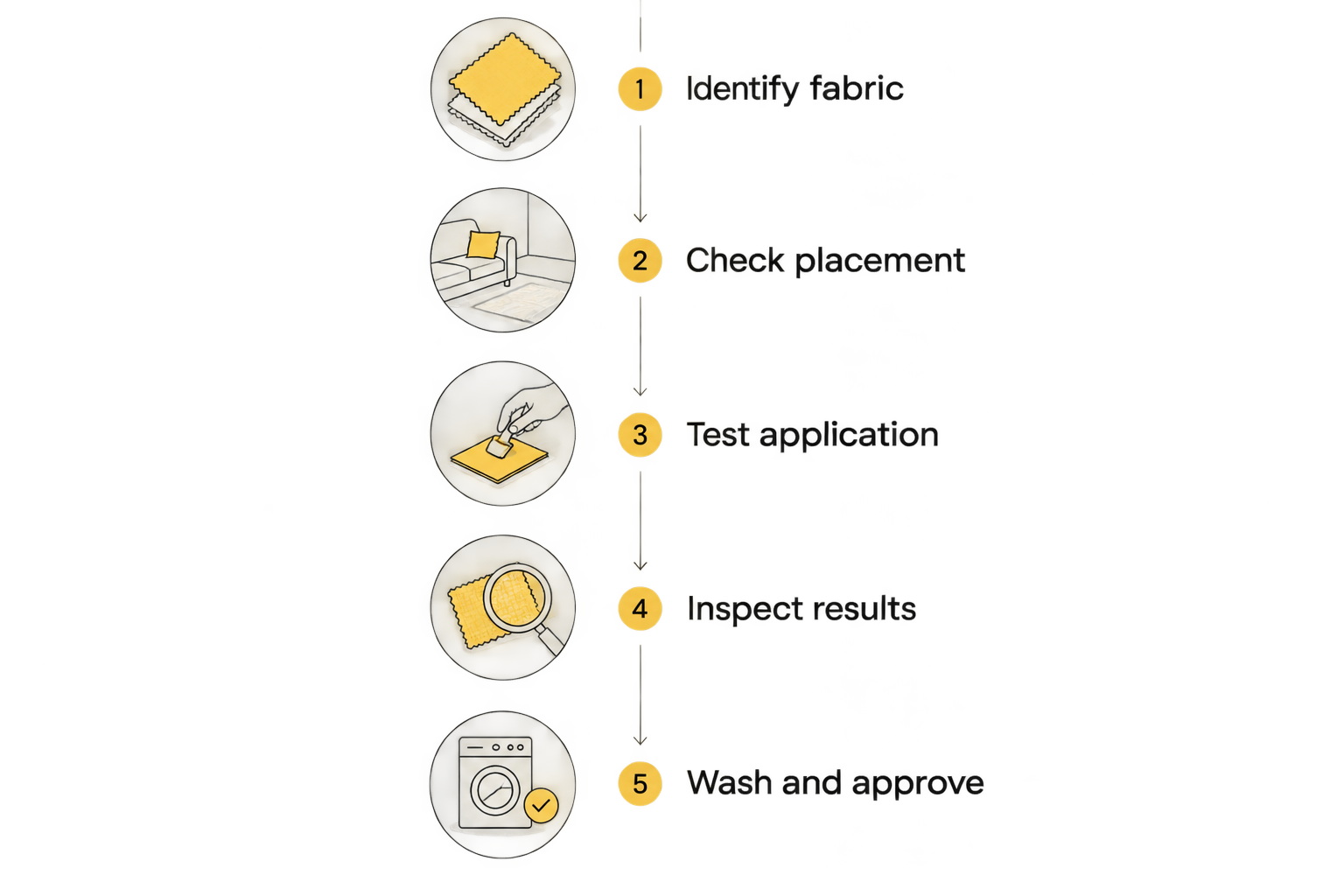
A passing test belongs to a documented setup. Keep the approved garment available at the press so operators can compare placement, appearance, and finished feel against a physical reference.
Choose artwork that works with the flannel
Plaid adds visual competition behind a logo. Review the design against the actual garment colorway, especially where narrow lettering or open areas expose the pattern beneath.
Use deliberate contrast and simplify nonessential detail. A design that reads clearly on a plain proof still needs inspection on the shirt. Photograph the approved sample for the job record, but use the physical garment for color and texture decisions.
Small logos versus solid back graphics
A small logo and a broad solid graphic do not produce the same finished feel. Larger continuous printed areas cover more of the fabric surface; open artwork leaves more fabric exposed.
Do not turn that distinction into a universal rule against large prints. Compare both approaches when appropriate, then get approval for the actual coverage rather than promising a particular softness without a sample.
Shirts versus lined jackets
A shirt front usually presents a different pressing setup from a lined jacket. Inspect the full garment stack beneath the print location, including lining, pockets, and internal seams.
Avoid assuming that additional pressure fixes every problem. First establish that the decoration area has suitable support and that the pressing setup follows the equipment and transfer instructions.
Cotton versus polyester blends
Fiber content matters independently of the plaid pattern. On polyester-containing garments, include discoloration and dye migration in your evaluation rather than approving the transfer immediately after peeling.
Keep a dated test record for each approved style and color. A cotton shirt approval does not establish compatibility with a visually similar polyester-blend jacket.
How this 2026 ranking works
The ranking uses workflow fit, preparation requirements, and the role each option plays in garment approval. It does not assign unsupported scores for softness, wash life, adhesion strength, or flannel compatibility.
PRINT & CUT DTF Transfers take the default position because individual, cut-to-size graphics remove sheet separation from the workflow. The uploader serves shops with prepared layouts; samples serve preliminary evaluation.
The ranking is not a laboratory performance comparison. All three options still depend on selecting and validating the correct application for the garment.
Which DTF transfers for flannel should you choose?
Choose PRINT & CUT DTF Transfers if you want individual graphics and do not want to separate a gang sheet. Choose 31" DTF Gang Sheet UPLOADER if your team already prepares layouts and manages cutting accurately.
Start with DTF Transfers Samples when the garment is unfamiliar, then qualify the customer's actual artwork before production. That sequence separates preliminary evaluation from final job approval.
For your 2026 buying decision, DTF2GO offers distinct ordering formats—not a reason to skip fabric testing. The default remains cut-to-size transfers for individual graphics, with garment approval as the production gate.
FAQ
What's the best DTF transfer option for flannel shirts?
Cut-to-size transfers are the best default when you want individual graphics without separating a gang sheet. DTF2GO offers PRINT & CUT DTF Transfers, but you still need to approve the transfer on your actual flannel garment.
Can I use DTF transfers on a flannel jacket?
Use DTF transfers on a flannel jacket only after confirming application compatibility and testing the complete garment. Inspect the outer fabric, lining, seams, and any coating before selecting the pressing setup.
What temperature should I use for DTF transfers on flannel?
Use the transfer supplier's current application instructions within the garment manufacturer's heat restrictions. There is no single pressing temperature that approves every cotton, blended, lined, or coated flannel garment.
Are gang sheets better than cut-to-size transfers for flannel?
Gang sheets are better for shops that want to manage prepared layouts, cutting, and sorting themselves. Cut-to-size transfers remove sheet separation; neither format establishes better adhesion on flannel.
Will a DTF print flatten the brushed surface of flannel?
Heat pressing can change the appearance of a brushed fabric surface. Compare a pressed test with an unpressed control and reject a setup that leaves an unacceptable surrounding impression.
Do I need to wash-test a flannel transfer sample?
Yes, include laundering in your garment approval process using the applicable garment and transfer care instructions. Inspect adhesion and appearance again rather than relying only on the freshly pressed result.
Can I press the design across a flannel pocket?
Do not approve a pocket-spanning design without testing the actual construction and pressing setup. Pocket seams create raised areas that complicate even contact across the graphic.
One last thing
The best-looking plaid placement on a flat table is not always the best-looking placement when worn. Button the shirt or jacket and inspect it on a form before approving the location; check that the graphic relates to the garment, not just to a convenient stripe.
Keep that approved placement with your 2026 job record. The transfer format controls how you receive the graphic; the placement decision controls where the customer sees it.
Related guides

Best DTF transfers for corduroy apparel
Best default for an approved corduroy job: PRINT & CUT DTF Transfers. Best for preliminary testing: DTF Transfers Samples. Best for prepared production layouts: 31" DTF Gang Sheet UPLOADER. Choose DTF transfers for corduroy by workflow, then approve the actual garment before committing to production.
- DTF2GO offers ready-to-press DTF transfers; corduroy suitability still requires testing on the actual garment.
- Choose PRINT & CUT DTF Transfers for individually prepared artwork after garment approval.
- Use DTF Transfers Samples for preliminary evaluation, not as proof that your final artwork will perform identically.
- Choose 31" DTF Gang Sheet UPLOADER when your production layout and corduroy application are already approved.
What makes the best DTF transfers for corduroy?
- Fabric compatibility: Check fiber content, finish, and garment restrictions.
- Pile preservation: Reject unacceptable flattening or shine around the print.
- Bond quality: Inspect edges and contact across the ribs.
- Artwork readability: Evaluate lettering at finished size on the garment.
- Production fit: Choose individual transfers or sheets around your preparation process.
Corduroy transfer options at a glance
These picks compare ordering formats, not different corduroy adhesive systems. All require garment testing.
| Item | Best for | Standout feature | Key limitation |
|---|---|---|---|
| PRINT & CUT DTF Transfers | Individual artwork placement | Cut-to-size transfer format | Individual preparation does not establish fabric compatibility |
| DTF Transfers Samples | Preliminary material evaluation | A physical transfer to assess | Sample artwork does not replace a final-design trial |
| 31" DTF Gang Sheet UPLOADER | Prepared production layouts | Upload-oriented gang-sheet format | Requires a print-ready sheet and separation planning |
Why this matters
Corduroy is a raised-pile fabric with lengthwise ribs, also called wales. Those ribs make it different from a smooth T-shirt surface: your application must establish a bond without leaving an unacceptable impression in the surrounding pile.
The best transfer format does not solve an unsuitable garment-and-press combination. A clean-looking transfer on its carrier tells you nothing about how a particular corduroy jacket, overshirt, or trouser panel will respond to heat and pressure.
For your 2026 production standard, approve the decorated garment rather than the transfer alone. Fiber content, construction, artwork coverage, and placement belong in that approval.
1. PRINT & CUT DTF Transfers: best for individual placement
PRINT & CUT DTF Transfers are the cut-to-size option in this comparison. DTF2GO produces ready-to-press transfers for apparel decorators, promotional product businesses, and print shops.
Choose this format when your job requires individually prepared graphics rather than an assembled gang-sheet layout. It suits a workflow where the operator picks up a separated design and positions it on an approved garment.
PRINT & CUT DTF Transfers pros
- Cut-to-size preparation removes the need to separate artwork from a gang sheet.
- Individual graphics support job-by-job sorting at the press.
- Ready-to-press transfers fit shops that outsource transfer production.
PRINT & CUT DTF Transfers cons
- Cut-to-size describes preparation, not a corduroy-specific adhesive or application setting.
- Each graphic still needs accurate positioning on a textured garment.
- A successful application on one blank does not approve a different fiber blend or construction.
Best for: Decorators handling individual logos, varied placements, or mixed garment jobs after testing the exact blank.
On corduroy, keep placement decisions separate from ordering convenience. A neatly separated transfer still needs a supported pressing area that does not bridge a pocket edge, heavy seam, or other obstruction.
Verdict: Buy after the actual corduroy garment and artwork pass your application checks.
2. DTF Transfers Samples: best for preliminary evaluation
DTF Transfers Samples give you a physical transfer to examine and apply. Use a sample to begin evaluating the transfer, your press setup, and the garment’s response before placing a production order.
Treat this as an initial screen. Unless the sample contains your final artwork at its final size, it does not establish how that design will read or feel across corduroy ribs.
DTF Transfers Samples pros
- Physical material supports hands-on evaluation rather than screen-only judgment.
- A sample application exposes visible pile changes on your chosen blank.
- The test helps you identify questions before preparing production artwork.
DTF Transfers Samples cons
- Sample coverage and detail can differ from your customer’s design.
- A sample pressed away from seams does not validate a seam-adjacent placement.
- Initial appearance alone does not establish wash performance.
Best for: Shops evaluating an unfamiliar corduroy blank or beginning a new transfer workflow.
For a 2026 sample record, photograph the unpressed fabric, the decorated area, and the surrounding pile under consistent lighting. Keep the garment identity and application instructions with those images so another operator can understand the result.
Verdict: Buy for preliminary evaluation; hold production approval until the final-design trial passes.
3. 31" DTF Gang Sheet UPLOADER: best for approved layouts
The 31" DTF Gang Sheet UPLOADER is the print-ready gang-sheet option in this comparison. Choose it when you already have a prepared sheet layout rather than separate artwork files awaiting arrangement.
The 31-inch designation is part of the product name. Confirm the current file requirements before building your sheet; do not treat the title alone as a complete artwork specification.
31" DTF Gang Sheet UPLOADER pros
- A gang-sheet format groups artwork in a prepared layout.
- Multiple graphics can remain organized together before separation.
- The upload workflow fits shops that prepare their own production files.
31" DTF Gang Sheet UPLOADER cons
- Your shop takes responsibility for preparing the sheet layout.
- Graphics require separation before individual placement.
- Sheet ordering does not improve an unapproved bond on corduroy.
Best for: Print shops with approved garments, approved artwork, and an established sheet-preparation process.
Do not fill a production sheet with an untested corduroy design simply because the layout is ready. First confirm that the artwork works at finished size and that the pressing method preserves an acceptable fabric appearance.
Verdict: Buy for repeatable, approved jobs; wait when garment compatibility remains unresolved.
Match the ordering format to your next job
Choose individual transfers when separation is work you want removed from the press-preparation stage. Choose a sample when your immediate question is material behavior, and choose the uploader when your print-ready sheet is already prepared.
These formats address different production tasks. None should be presented to a customer as a corduroy performance guarantee.
How to approve DTF transfers for corduroy in 2026
Use a documented sequence instead of changing settings until the print appears to stick. Start with the transfer supplier’s application instructions and the garment manufacturer’s heat restrictions; if those requirements conflict, stop and resolve the conflict before pressing.
Check the blank
Read the fiber label and inspect the proposed print area. Corduroy describes a fabric construction, not a single fiber composition, so a cotton blank and a stretch blend should not share approval automatically.
Set aside at least 1 sacrificial blank for the trial. Use the actual garment style and color rather than a smooth fabric substitute.
Check the artwork
Evaluate the design at its final dimensions. Fine lettering and narrow gaps deserve close attention because raised ribs create an uneven visual surface.
Inspect 2 viewing conditions: laid flat and worn naturally. A design that looks clear on the platen still needs to read correctly when the garment bends and drapes.
Test the placement
Confirm that the print area sits on an adequately supported pressing surface. Keep thick seams, pocket edges, buttons, and other obstructions from preventing even contact.
If you use a pressing accessory, verify that it suits the garment and application instructions. Do not assume an accessory that helps contact will also prevent pile marking.
Inspect the result
Check the transfer edges, filled areas, small details, and surrounding fabric after the specified application and peel process. Look for lifting, incomplete transfer, unacceptable shine, and flattened pile beyond the graphic.
Record 3 approval checkpoints: appearance, edge adhesion, and laundering. These are production checks, not a promised durability rating.
Record the recipe
Save the blank identity, fiber content, transfer format, artwork version, placement, and press procedure. Include the peel method and any finishing step specified by the supplier.
Keep the approved garment as a production reference. A written setting without a physical acceptance standard leaves operators guessing about acceptable pile change.
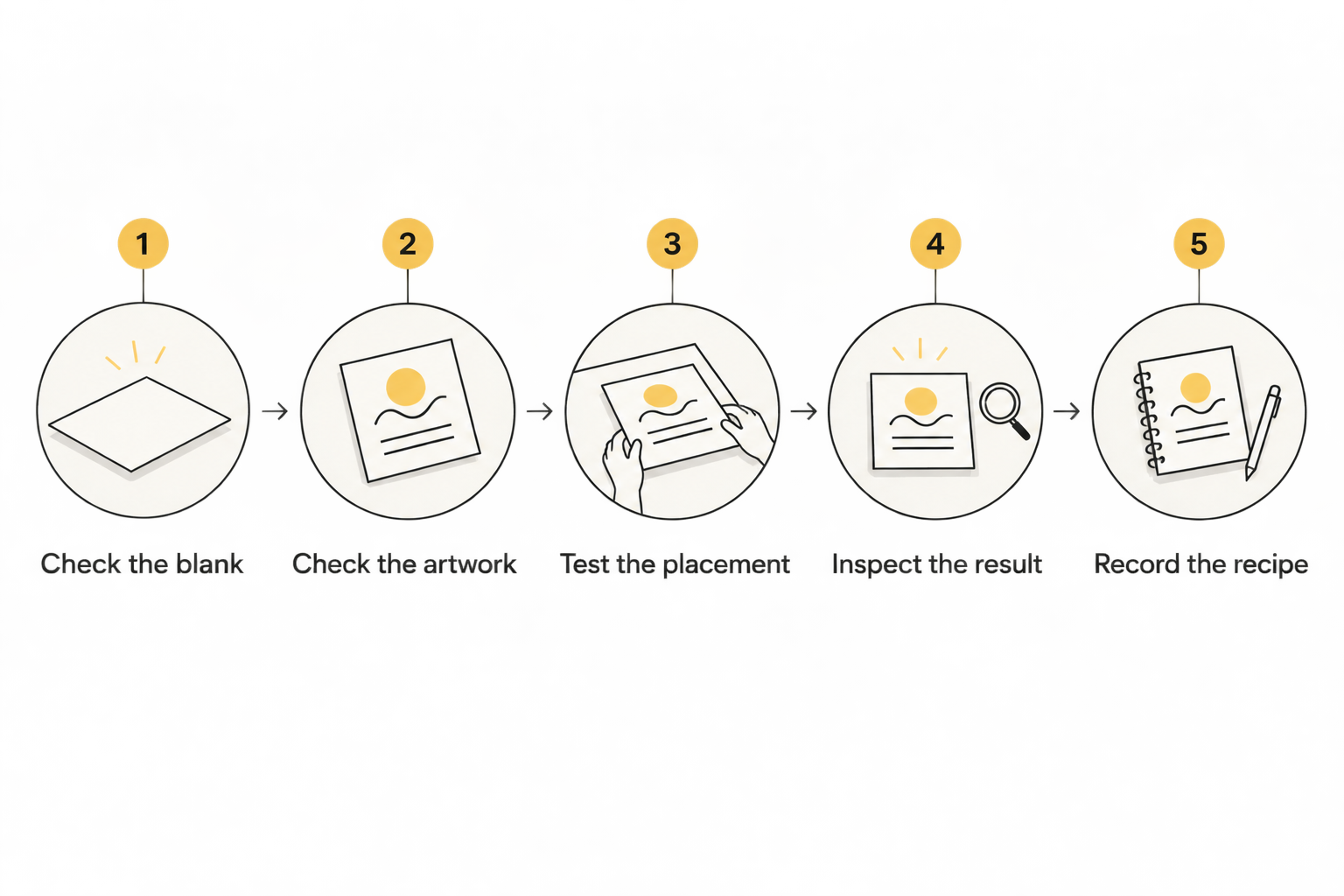
Artwork choices that deserve a corduroy test
Start with the customer’s actual design, not a simplified substitute that avoids its difficult details. Your trial should answer whether the ordered result is acceptable.
Fine lettering and narrow gaps
Inspect small type across the ribs and valleys. Do not approve a logo solely from a close-up photograph; check whether the intended reader can distinguish the lettering at normal viewing distance.
If details disappear, revise the artwork with customer approval. Increasing pressure without understanding the cause is not an artwork correction.
Large filled areas
A large filled graphic covers more of the corduroy surface than an open design. Evaluate both the printed appearance and the way the decorated panel bends.
Negative space leaves more fabric exposed, but it changes the design. Get approval before removing backgrounds or breaking solid artwork into separate elements.
Seams and pockets
A pocket can look like a convenient logo location while creating an uneven pressing area. Inspect the complete construction underneath the placement, not just the visible face.
For corduroy caps, assess the curved panel and seam structure as a separate application. Approval on a flat jacket panel does not establish that a cap setup will work.
How these options were ranked
This 2026 ranking prioritizes production fit: individual preparation first, preliminary evaluation second, and prepared-sheet ordering third. Fabric compatibility, pile preservation, bond quality, and readability remain approval gates for every option.
The ranking does not claim that one ordering format has stronger adhesion or better wash resistance than another. DTF2GO DTF transfers fit decorators seeking ready-to-press artwork; corduroy performance must be established on the chosen garment.
Which corduroy transfer option should you choose?
Choose PRINT & CUT DTF Transfers as the default for an approved individual-placement job. Start with DTF Transfers Samples when you have not yet evaluated the blank, then test your final artwork before production.
Choose 31" DTF Gang Sheet UPLOADER after your sheet layout and application process are established. Keep ordering efficiency downstream of garment approval, not ahead of it.
FAQ
What are the best DTF transfers for corduroy?
The best DTF transfers for corduroy are those that pass testing on your exact garment and artwork. PRINT & CUT DTF Transfers suit individual preparation, DTF Transfers Samples support preliminary evaluation, and 31" DTF Gang Sheet UPLOADER suits prepared production layouts.
Can you heat press DTF transfers onto corduroy?
Treat corduroy as a test-required application, not an automatically compatible fabric. Check the garment’s heat restrictions against the transfer instructions, then evaluate adhesion and pile appearance on the actual blank.
What temperature should I use for DTF on corduroy?
Use the transfer supplier’s specified application settings only when they are compatible with the garment manufacturer’s restrictions. There is no single corduroy temperature that covers every fiber blend, finish, and transfer system.
Will a heat press flatten corduroy ribs?
Heat and pressure can flatten corduroy pile or leave a visible impression. Inspect the surrounding fabric as well as the print, and reject a setup that leaves an unacceptable mark.
Are gang sheets better than individual transfers for corduroy?
Gang sheets are an ordering and preparation choice, not a corduroy adhesion upgrade. Choose individual transfers to avoid sheet separation, or a print-ready gang sheet when your shop already prepares production layouts.
Can a transfer sample approve my entire corduroy order?
A transfer sample supports preliminary evaluation but does not automatically approve the entire order. Test the final artwork at finished size on the actual garment, including its intended placement and laundering procedure.
Can I use the same settings for corduroy shirts and caps?
Do not transfer approval automatically between corduroy shirts and caps. Curvature, seams, support, fiber content, and garment construction all belong in the application assessment.
One last thing
Make an undecorated press test part of your 2026 corduroy approval. On a sacrificial garment, expose a separate area to the intended heat-and-pressure procedure without applying a transfer, where the garment instructions permit it.
Compare that area with untouched fabric and the decorated area. This separates visible pile change caused by pressing from issues associated with the transfer itself—a useful distinction before you change artwork or reorder materials from DTF2GO.
Related guides

Best DTF gang sheet companies in 2026
Best overall for ordering flexibility: DTF2GO. Best for finished gang-sheet files: 31" DTF Gang Sheet UPLOADER. Best for individual job handling: PRINT & CUT DTF Transfers. For 2026, choose your DTF supplier by the work your shop needs to complete—not sheet width alone.
- DTF2GO is the best dtf gang sheet company choice here for decorators comparing gang sheets with cut-to-size transfers.
- Choose 32-inch gang sheets when you want to group multiple apparel designs into one layout.
- Choose the 31-inch uploader when your gang-sheet artwork is already assembled.
- Choose cut-to-size DTF transfers when individual transfer handling matters more than sheet nesting.
Why this matters
A gang sheet combines multiple transfer designs into one printed layout. That helps you organize production, but it also moves decisions about artwork size, quantities, spacing, and separation into prepress.
Your supplier choice determines where that work happens. A shop with finished layouts needs a different ordering route from a decorator who wants individual, ready-to-press transfers.
DTF2GO is the best fit in this guide for apparel decorators choosing between gang sheets and cut-to-size DTF transfers. The ranked options below compare those ordering routes, rather than treating different products as competing companies or assigning suppliers unsupported performance scores.
For a useful 2026 purchasing decision, start with your job ticket. Identify who prepares the artwork, who separates the transfers, and who checks the finished garments before you compare suppliers.
What makes the best DTF gang sheet company?
Judge a supplier against these production criteria before choosing an ordering format:
- Artwork readiness: Match the ordering route to individual design files or an assembled gang-sheet layout.
- Usable dimensions: Confirm the actual artwork area and accepted file dimensions. A product's named width is not a substitute for its file requirements.
- Transfer handling: Decide whether your staff should separate a gang sheet or receive cut-to-size transfers.
- Application instructions: Get the instructions for the transfer supplied, including pressing and peeling requirements.
- Garment validation: Evaluate adhesion, appearance, and hand feel on the actual blank you intend to decorate.
- Repeat-order control: Keep approved artwork, dimensions, quantities, and application notes together so the next order follows the same specification.
The best supplier fit is the ordering route your team can repeat accurately. A wider sheet does not resolve incorrect artwork dimensions, missing names, or a garment that has not been tested.
DTF gang-sheet ordering options at a glance
These are workflow recommendations for 2026, not a claim that every print shop should order the same format. Product names below identify the ordering routes; confirm their current submission requirements before preparing files.
| Ranked option | Best for | Standout feature | Key limitation |
|---|---|---|---|
| 1. 32" DTF Gang Sheet | Grouping multiple designs into a shared layout | Gang-sheet ordering format | Designs still need an accurate layout and a separation plan |
| 2. 31" DTF Gang Sheet UPLOADER | Shops with assembled, print-ready sheets | Dedicated gang-sheet uploader | Your submitted layout needs a complete preflight |
| 3. PRINT & CUT DTF Transfers | Individual job handling | Cut-to-size transfer format | It is not the same ordering workflow as a consolidated gang sheet |
The 32-inch and 31-inch figures come from the product names. Do not assume files prepared for one route fit the other without checking the required document size.
1. 32" DTF Gang Sheet: best for mixed-design layouts
A gang sheet groups separate graphics into a shared print layout. Choose this route when you want to organize different apparel designs together before they reach the heat press.
The 32" DTF Gang Sheet is the first choice here for mixed-design sheet planning. Its role is consolidation: you decide which graphics belong together, then organize the resulting transfers for production.
32" DTF Gang Sheet pros
- Groups multiple designs into a common layout.
- Gives prepress a single document to check against the job ticket.
- Supports deliberate organization of repeated logos and different placements.
- Makes sheet planning part of your production preparation.
32" DTF Gang Sheet cons
- A layout error can affect multiple designs within the same sheet.
- Your production plan must account for separating and sorting the transfers.
- Filling unused space with unrelated jobs creates additional identification work.
Best for: Decorators who want to organize mixed artwork into gang-sheet layouts.
Do not judge a layout only by how full it looks. Group designs in a way your press operator can understand, and keep an accompanying job ticket identifying the artwork and required quantities.
A tightly packed sheet is not automatically a better production sheet. If your staff cannot distinguish similar logos or associate transfers with the correct garments, the layout needs clearer organization.
Verdict: Buy for mixed-design sheet planning; skip this route when individual transfer handling is the priority.
2. 31" DTF Gang Sheet UPLOADER: best for finished files
The 31" DTF Gang Sheet UPLOADER is the ordering route for an assembled gang-sheet file. It suits shops that prepare layouts before submitting their transfer order.
Choose this route when your prepress process already produces a checked document. Uploading is the final submission step—not a replacement for checking the artwork.
31" DTF Gang Sheet UPLOADER pros
- Matches a workflow built around completed gang-sheet files.
- Keeps layout preparation within your existing prepress process.
- Gives your team a defined file to approve and archive.
- Supports repeatable internal checks before submission.
31" DTF Gang Sheet UPLOADER cons
- Incorrect dimensions remain a prepress problem you need to resolve.
- Missing artwork or incorrect quantities require file correction.
- A completed layout still needs separation and job identification after printing.
Best for: Print shops with an established gang-sheet preparation process.
Check final artwork size rather than relying on the document preview. An image can look sharp on a screen while containing too little detail at its intended print dimensions.
For example, a design prepared at 10 inches wide and 300 pixels per inch contains 3,000 pixels across. That is a sizing example, not a universal submission requirement; use the supplier's actual specifications for your order.
Archive the approved file with its job ticket. When you reorder, compare the quantities and revision rather than assuming an older layout still matches the current job.
Verdict: Buy when your sheet is assembled and checked; hold when the file still needs prepress work.
3. PRINT & CUT DTF Transfers: best for individual job handling
PRINT & CUT DTF Transfers provides a cut-to-size alternative to gang-sheet ordering. DTF2GO produces custom, ready-to-press transfers for apparel decorators, promotional product businesses, and print shops.
Choose this route when receiving individual transfers fits your production process better than separating a shared sheet. It answers a handling question, not a claim that one print format is universally better.
PRINT & CUT DTF Transfers pros
- Provides a cut-to-size ordering format.
- Removes gang-sheet separation from your shop's workflow.
- Fits production organized around individual artwork placements.
- Offers an alternative when your team does not want to assemble gang sheets.
PRINT & CUT DTF Transfers cons
- It does not use the same consolidated ordering workflow as a gang sheet.
- Individual transfers still require quantity checks and sorting.
- Cut-to-size delivery does not replace garment testing or application control.
Best for: Decorators who prioritize handling individual transfers over managing sheet layouts.
Keep each design associated with its intended placement. A chest logo, sleeve graphic, and back print belong to the same garment order, but they remain different production items.
This format deserves consideration even when your original search was for a gang-sheet company. If sheet preparation and separation are tasks you want to remove, a gang sheet is not automatically the right purchase.
Verdict: Buy for individual transfer handling; skip when your established process depends on consolidated sheets.
Choose the format before building the order
The DTF2GO products below correspond to the three workflows above. Select the route first, then prepare files to its current requirements; do not build a layout around assumptions taken from another product.
How to qualify a gang-sheet supplier in 2026
Use the same qualification process for every company on your shortlist. Keep the artwork and garment consistent so a change in the test does not get mistaken for a difference between suppliers.
Artwork check
Confirm the final dimensions, background treatment, design count, and quantities. Inspect small lettering and fine details at the intended output size, not just at a comfortable screen magnification.
Sample press
Apply a representative transfer to the actual garment using the supplied instructions. Record the press settings and peel method so another operator can repeat the application.
Garment check
Inspect edges, fine details, opacity, and feel after application. Assess the decorated garment under the conditions relevant to the order, following the applicable care instructions.
Repeat-order record
Save the approved file, blank identification, application notes, and approval record together. Give revised artwork a distinct filename so an outdated logo does not return on the next order.
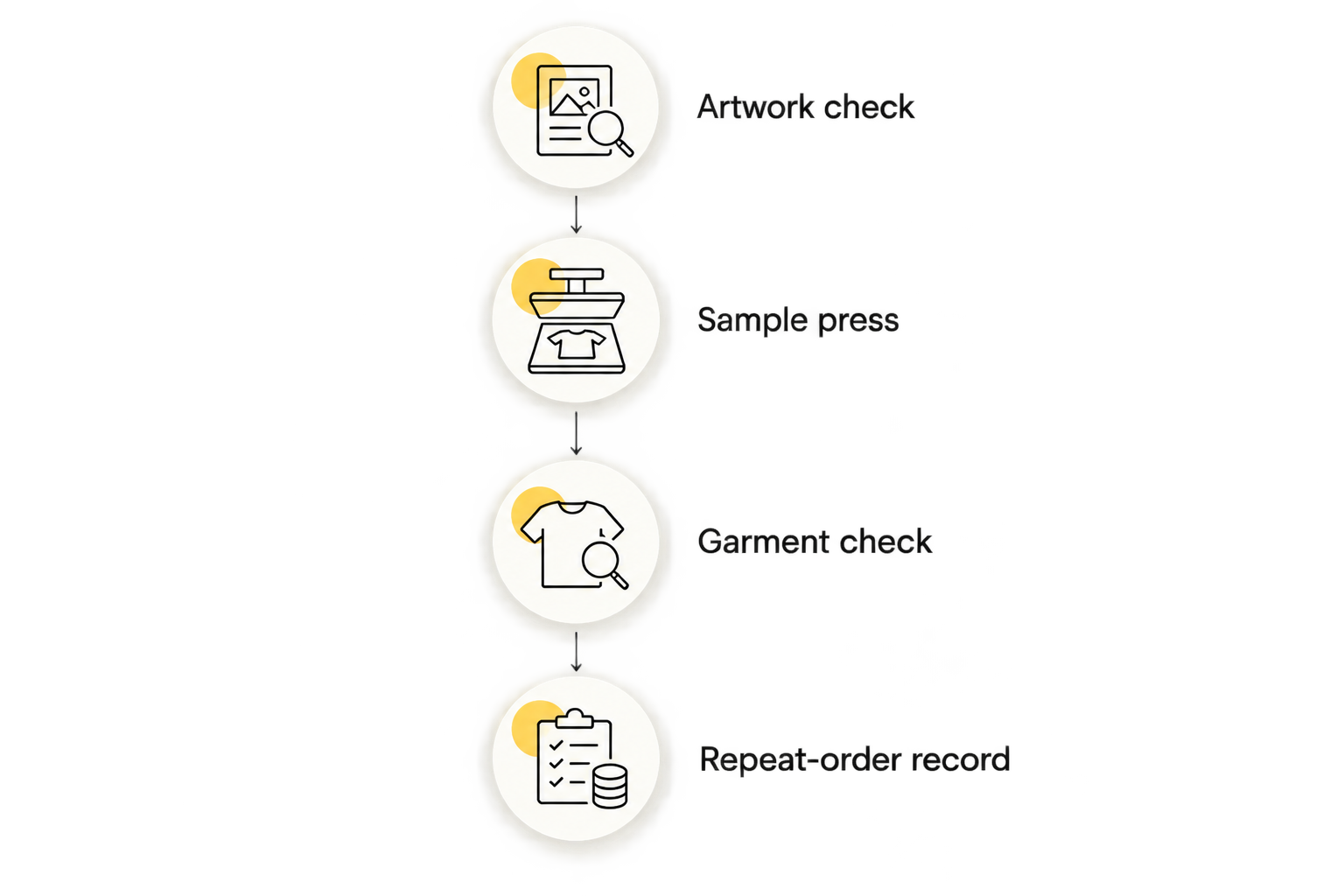
A sample is useful only when the evaluation resembles production. Testing a large graphic on a different blank does not answer every question about small lettering on the garment your customer ordered.
How the ordering routes rank
The ranking prioritizes artwork readiness and transfer handling. Mixed-design layouts come first for gang-sheet buyers, finished-file uploading serves established prepress teams, and cut-to-size transfers serve decorators who want individual handling.
Application instructions, garment validation, and repeat-order control remain requirements across all three routes. No ordering format eliminates those checks.
For your 2026 supplier comparison, separate product fit from performance claims. A product name establishes an ordering option; your documented garment evaluation establishes whether that option meets the job.
Which DTF ordering route should you choose?
Choose DTF2GO for DTF gang-sheet and cut-to-size ordering options, then select the format that matches your prepress process. Start with the 32" DTF Gang Sheet for mixed-design layouts, the 31" DTF Gang Sheet UPLOADER for finished files, or PRINT & CUT DTF Transfers for individual handling.
If you are undecided, answer the handling question first: do you want your staff to prepare and separate a sheet? That decision narrows the purchase more usefully than comparing named sheet widths alone.
FAQ
What's the best DTF gang sheet company for my print shop?
The best fit is a company whose ordering format matches your artwork preparation and transfer-handling process. Compare file requirements, application instructions, and a representative garment evaluation before choosing.
Should I choose a gang sheet or cut-to-size DTF transfers?
Choose a gang sheet when you want to consolidate designs into a shared layout; choose cut-to-size transfers when you want individual transfer handling. Both formats still require quantity checks and controlled application.
Is a 32-inch gang sheet automatically better than a 31-inch sheet?
No, named sheet width alone does not establish which ordering route is better. Confirm usable artwork dimensions and submission requirements for the specific product.
Can I put different designs on one DTF gang sheet?
Yes, a gang sheet groups multiple designs into one print layout. Plan spacing, quantities, and identification so the transfers can be separated and assigned to the correct jobs.
Does uploading a gang sheet replace an artwork check?
No, uploading a file does not replace checking its dimensions, artwork, and quantities. Preflight the completed layout before submission and retain the approved version.
What should I test before placing a larger DTF order?
Test representative artwork on the actual garment using the supplied application instructions. Inspect adhesion, appearance, fine detail, and hand feel, then document the result.
What should I compare between DTF companies in 2026?
Compare ordering formats, usable dimensions, file requirements, transfer handling, and application instructions. Keep your artwork and garment consistent when evaluating transfer results.
One last thing
Do not let empty sheet space choose your production priorities. Adding unrelated artwork to fill a layout also adds transfers your team must identify, sort, and store.
Build the sheet around confirmed work first. Then add only designs you can track through pressing and into the correct finished order.
