

News


Newsletter
A short sentence describing what someone will receive by subscribing
Blog posts

Can non-UV DTF transfers be applied to wood or metal?
Non-UV DTF transfers can adhere to some wood or metal surfaces, but you should treat the application as a substrate test—not an approved substitute for apparel printing. Heat tolerance, surface finish, adhesive compatibility, and intended use determine whether the result is suitable; a successful film peel alone does not prove durability.
- Non-UV DTF transfers on wood or metal require substrate-specific testing before production.
- Standard DTF uses heat-activated adhesive; UV-DTF uses a different hard-surface transfer process.
- DTF2GO supplies ready-to-press apparel transfers; do not assume those transfers are approved for rigid substrates.
- Test the actual finish, inspect the cooled bond, and validate the intended use before accepting a job.
Why this matters
A graphic that looks correct when it leaves the press can still lift at the edges, separate from a coating, or fail during cleaning. Wood and metal introduce variables that an apparel press recipe does not resolve.
For a 2026 production decision, separate initial adhesion from finished-product suitability. The process discussion in UV-DTF transfers for wood and metal signage concerns a different transfer system; the shared DTF name does not make the materials interchangeable.
Approve the transfer, surface finish, and application method together. A pass on one blank does not qualify every item made from the same base material.
Can non-UV DTF transfers be applied to wood or metal?
Yes, on some surfaces, provided the transfer supplier supports the application and your finished-item testing confirms acceptable adhesion. Standard apparel DTF uses a heat-activated adhesive layer. Wood grain, surface coatings, and the way a rigid blank receives heat and pressure change the application conditions.
Use this comparison to separate a possible test from a production-ready choice.
| Transfer and surface | Best for | Advantage | Limitation |
|---|---|---|---|
| Non-UV DTF on wood | Controlled trials on supplier-supported, heat-tolerant blanks | Uses a heat-transfer workflow | Grain, moisture, and finishes complicate contact and adhesion |
| Non-UV DTF on metal | Controlled trials on supplier-supported, flat blanks | Allows testing of detailed heat-transfer graphics | Metal conducts heat, and coatings introduce a separate bonding surface |
| UV-DTF on suitable rigid surfaces | Hard-surface decoration when the supplier approves the finish | Typical ready-to-apply transfers do not require a heat press | Roughness, contamination, and incompatible finishes still affect adhesion |
The relevant question is not simply whether the graphic sticks. Ask whether the complete decorated item survives handling, cleaning, and the environment you intend to specify.
For your 2026 job records, distinguish an experimental application from a qualified production method. Do not describe an untested wood or metal application as equivalent to the transfer's intended apparel use.
Non-UV DTF on wood: qualify the finished surface
Wood is not a uniform printing surface. Unfinished grain, sanding dust, moisture, paint, and clear finishes each change what the adhesive touches.
A smooth face improves physical contact, but smoothness does not establish chemical compatibility. A sealed panel also presents the sealant—not bare wood—to the transfer adhesive. If the coating releases from the wood, the graphic can come away with it even when the adhesive remains attached to the coating.
Before attempting a transfer:
- Identify whether the face is unfinished, painted, stained, laminated, or clear-coated.
- Confirm that the blank and its finish tolerate the proposed heat and pressure.
- Remove loose dust using a preparation method compatible with the surface.
- Test a matching offcut or spare blank rather than the customer's finished piece.
- Inspect for finish changes as well as transfer adhesion.
Best for: controlled decorative trials where you can verify the exact blank and finish. Main drawback: a result on one wood panel does not establish compatibility with another finish, grain condition, or construction.
Do not add a sealer solely because it appears to make the surface smoother. That creates a new coating system requiring its own compatibility and heat-tolerance checks.
Non-UV DTF on metal: identify the coating first
Metal is a broad category, not an application specification. Bare aluminum, painted steel, and powder-coated blanks present different surfaces to an adhesive.
Metal also conducts heat. Blank thickness, construction, and contact with the press affect the heating process, so a garment recipe does not establish the temperature reached at the adhesive interface. Hollow items and uneven shapes create additional contact problems.
Start by identifying the actual decorated face. Ask the blank supplier about its coating and permitted decoration methods before applying heat.
- Keep curved or irregular objects out of a flat-press trial unless suitable equipment and instructions support them.
- Inspect the finish for oil, residue, corrosion, or loose coating.
- Use only a surface cleaner approved for that finish.
- Check whether pressure leaves an impression or damages the blank.
- Handle heated metal with appropriate protection and follow equipment safety instructions.
Best for: flat, supplier-supported test blanks with known finishes. Main drawback: the metal's heat tolerance does not prove that its paint, coating, adhesive joints, or other components tolerate the process.
A metal object can remain structurally intact while its decorative finish changes. Inspect both.
Why adhesion varies on wood and metal
The adhesive bonds to the surface it touches. That makes surface condition more useful than the generic material name when diagnosing a failed application.
- Surface chemistry: Paint, clear coat, laminate, and bare substrate are different bonding surfaces. Approval must cover the actual finish.
- Surface texture: Grain, pores, and texture interrupt contact. A graphic bridging a recess does not have the same support as one bonded across a flat face.
- Contamination: Dust, oil, wax, and cleaning residue can sit between the adhesive and the blank. Preparation must remove contamination without damaging the finish.
- Heat and pressure: A rigid object receives heat and pressure differently from a garment. Shape and support determine whether contact is even.
- Service conditions: Handling, abrasion, moisture, cleaners, and outdoor exposure place different demands on the finished decoration.
When a trial fails, change a documented variable rather than repeatedly increasing heat or dwell time. More heat is not a general remedy for an incompatible adhesive or unstable coating.
For repeat work in 2026, retain the blank specification and preparation method alongside the transfer instructions. Those details make the trial repeatable.
How do you test non-UV DTF on a rigid blank?
Use a spare blank that matches the production item, including its finish. A test on unrelated scrap answers a different question.
Identify the surface
Record the blank supplier, material, finish, and intended use. Include coating information wherever the supplier provides it, and note whether the graphic area is flat or textured.
Confirm compatibility
Ask the transfer supplier whether the specific transfer is supported on that surface. Confirm the blank's permitted heat exposure separately; transfer instructions do not establish the blank's limits.
Prepare the blank
Follow the blank supplier's cleaning guidance. Avoid introducing an unapproved solvent, primer, or topcoat into the test, because each additional material changes the system being evaluated.
Apply as directed
Use substrate-specific instructions when available. If neither supplier supports the combination, do not turn an apparel recipe into a customer production specification.
Inspect and validate
Follow the transfer's peel instructions, then inspect the finished item after cooling and any supplier-specified waiting period. Check edge lift, visible gaps, coating damage, and resistance to the handling and cleaning the item will receive.
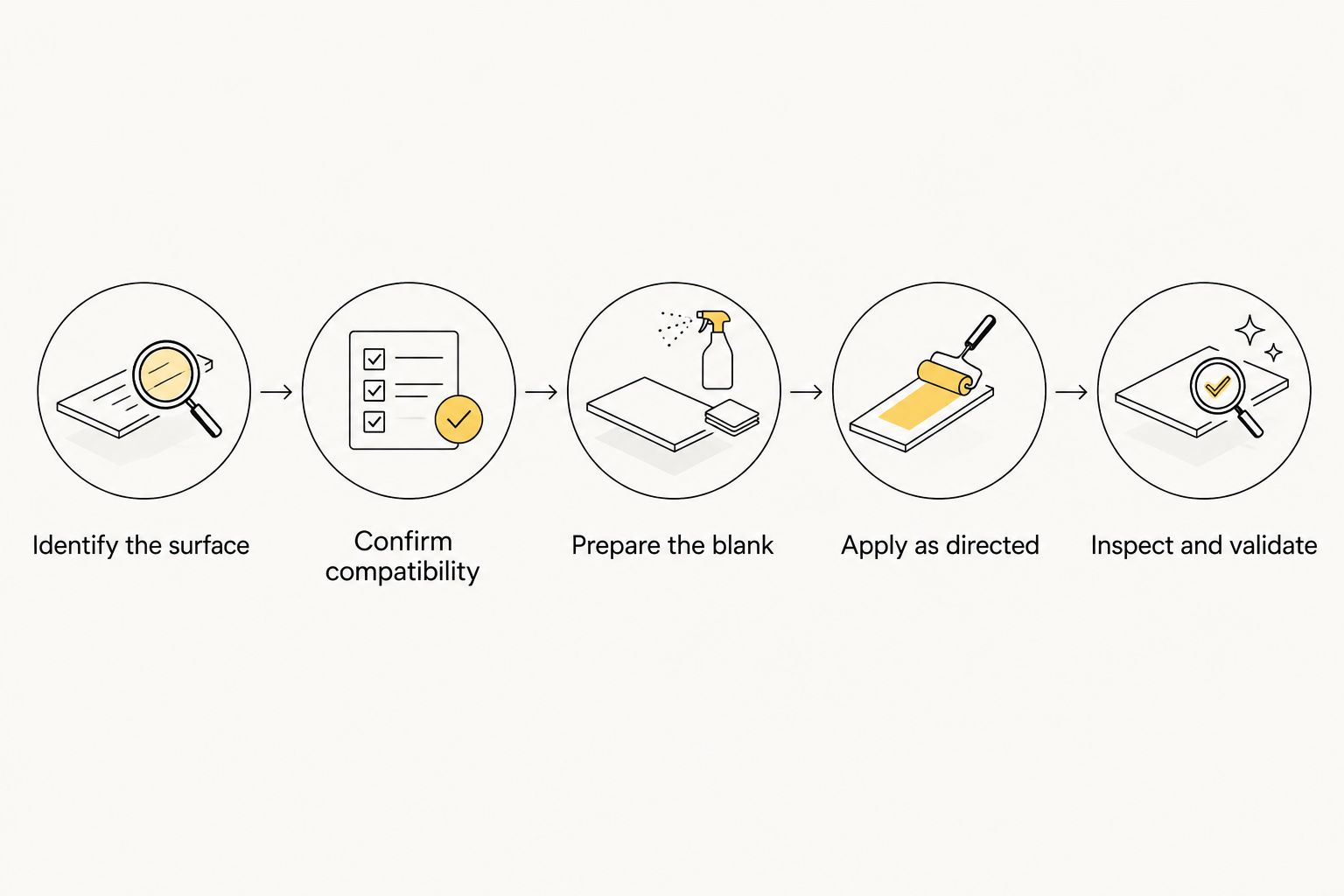
Keep a retained sample and document the result. A photograph records appearance, but it cannot establish bond strength or resistance to cleaning.
Is UV-DTF a better choice for wood and metal?
UV-DTF is the more relevant transfer category to evaluate for hard-surface decoration, but it is not universal. Typical UV-DTF transfers use UV-cured printed layers and an adhesive application process rather than the heat-activated powder adhesive used in standard apparel DTF.
That distinction matters when the blank cannot tolerate a heat press. It does not remove the need for a clean, compatible surface, and it does not make rough wood or textured coatings automatically suitable.
Choose by the finished item's requirements. For an outdoor sign or handled metal item, the distinction between waterproof versus regular stickers illustrates why water resistance alone is not a complete specification: adhesion, abrasion, cleaning, and weather exposure remain separate questions.
Do not treat UV curing during transfer manufacture as proof that the decorated object is qualified for outdoor use. Likewise, do not assume a rigid-surface graphic is dishwasher-safe or suitable for food-contact areas without explicit supporting instructions.
For a 2026 specification, request written application and care guidance for the exact transfer and blank combination. A category name is not a durability rating.
Can you use the same transfer order for shirts and signs?
Do not assume that an apparel transfer order also qualifies for rigid signage. The artwork can be shared, but the adhesive system and application requirements still need to match each substrate.
DTF2GO ready-to-press DTF transfers are best for apparel decorators buying custom transfers for garment decoration. DTF2GO produces custom cut-to-size apparel transfers; that stated purpose does not establish wood or metal compatibility.
The benefit is a transfer format intended for an apparel workflow. The limitation for this project is equally clear: you need separate confirmation before specifying a non-apparel use. Send the substrate, finish, shape, and intended service conditions through the contact page rather than asking only whether a transfer works on metal.
For a mixed order, keep garment decoration and hard-surface decoration as separate production specifications. Matching artwork does not require matching application chemistry.
What should make you reject a test application?
Reject a trial that damages the blank, leaves unsupported edges, or fails the intended handling and cleaning checks. Do not pass it because the central area looks good.
Look for these failure modes:
- The graphic lifts with light handling at an exposed edge.
- The carrier removes part of the design despite following the specified peel method.
- Paint or clear coat separates with the transfer.
- Heat changes the finish, shape, or appearance of the blank.
- The decoration fails the cleaning method required for the finished item.
Record what separated. Adhesive releasing from a coating is a different failure from the coating releasing from the blank, and the remedies are not interchangeable.
Do not cover a failed test with clear coat and call the problem solved. A topcoat adds another material interface and requires its own validation.
FAQ
Can I heat-press a regular DTF transfer onto wood?
Some wood surfaces can accept a regular DTF transfer, but only a supplier-supported application and testing can establish suitability. Confirm the finish's heat tolerance and test a matching spare blank before production.
Will non-UV DTF transfers stick to bare metal?
Do not assume non-UV DTF transfers will form a suitable bond on bare metal. Confirm adhesive compatibility, surface preparation, and application instructions for the specific metal before testing.
Is UV-DTF the same thing as regular DTF?
UV-DTF and regular DTF use different transfer systems. Standard apparel DTF uses heat-activated adhesive, while typical UV-DTF transfers use UV-cured printed layers and an adhesive process for suitable rigid surfaces.
Do I need to seal wood before applying a DTF transfer?
Sealing wood is not a universal requirement or a guaranteed fix for adhesion. A sealer becomes the bonding surface, so its compatibility and heat tolerance need separate confirmation.
What heat-press settings should I use for DTF on metal?
Use only settings supported for the specific transfer, metal blank, and finish. An apparel setting does not establish safe heat exposure or adequate adhesion on a rigid object.
Will a DTF transfer on metal be waterproof or dishwasher-safe?
Do not claim waterproof or dishwasher-safe performance without evidence for the finished transfer-and-blank combination. Water exposure, cleaning chemicals, heat, and abrasion are separate service conditions.
Can I use DTF2GO apparel transfers for wood signs?
Do not assume DTF2GO apparel transfers are approved for wood signs. Confirm the exact wood finish and proposed application with the supplier before testing or accepting production work.
One last thing
You are decorating the outermost surface, not the material name on the invoice. A painted metal sign presents paint to the adhesive; a clear-coated wood plaque presents clear coat.
Make that outer layer the starting point of your next test. Identifying it before pressing is more useful than repeatedly adjusting a garment recipe on an unknown finish.
Related guides

Does DTF printing cause dye migration on polyester?
Yes—heat used to apply DTF transfers can trigger dye migration on polyester, allowing garment dye to discolor the transfer, especially its white and light-colored areas. It is not inevitable, but a clean print immediately after pressing does not prove lasting color stability: qualify the exact garment and transfer combination before production.
- DTF dye migration polyester checks must assess garment dye movement, white-underbase discoloration, and adhesion separately.
- Heat application can mobilize polyester dyes; a white underbase is not automatically a dye blocker.
- Test the actual garment color and transfer together, then inspect again after cooling and holding.
- DTF2GO supplies ready-to-press DTF transfers for decorators; polyester compatibility still requires a garment-specific test.
Does DTF printing cause dye migration on polyester?
DTF application can trigger polyester dye migration; DTF ink is not necessarily the source of the unwanted color. Heat increases dye mobility in polyester, and garment color can move into the applied decoration. Disperse dyes used to color polyester are central to this problem.
Use the location and appearance of the defect to separate migration from other heat-press issues. A tinted transfer, a shiny platen-shaped mark, and a lifting edge need different corrections.
| What you see | What it indicates | What to check next |
|---|---|---|
| White artwork picks up the garment's hue | Consistent with dye migration | Compare against an unapplied transfer and a control garment |
| Fabric darkens or becomes shiny around the design | Heat or pressure marking, not proof of migration | Inspect the undecorated fabric and platen footprint |
| Edges lift without a color shift | An adhesion problem, not proof of migration | Check application instructions, pressure, and fabric compatibility |
| A garment pattern appears within light artwork | Consistent with patterned dye migrating into the decoration | Test that exact printed fabric with a suitable transfer system |
Why this matters
A polyester job has to pass both a bond check and a color check. Strong adhesion does not establish dye resistance, and a bright white print does not establish wash performance.
For your 2026 production checklist, treat fabric composition, garment color, and transfer construction as separate approval fields. The guide to heat-pressing DTF transfers on polyester covers the application side; migration testing determines whether that application also preserves the intended artwork color.
Approve the finished garment, not just the transfer. An acceptable result on a cotton tee does not qualify the same artwork on a polyester jersey.
Why dye migration on polyester varies
Polyester is a fabric category, not a uniform decoration surface. Different garments use different dyes, finishes, and manufacturing processes, so a successful job does not automatically qualify another style or color.
The production variables that matter are:
- Garment dye system. Dye chemistry and how well the dye is fixed influence its movement during heat application.
- Fabric coloration. Sublimated patterns and deeply colored polyester deserve direct testing beneath white or pale artwork.
- Heat exposure. Application temperature, dwell, prepressing, and finishing presses contribute to the garment's total heat history.
- Transfer construction. White ink supplies opacity; a purpose-designed migration barrier serves a different function.
- Artwork contrast. A small amount of garment-colored contamination is easier to see in white lettering than in a similarly colored graphic.
- Inspection timing. Discoloration is not always fully apparent when the carrier first comes off.
Do not turn those factors into a blanket rule that every dark polyester garment fails. Risk identifies what needs testing; it does not replace the test.
Does a white DTF underbase stop polyester dye migration?
A white DTF underbase does not, by itself, establish dye-blocking performance. Its primary role is to provide an opaque foundation so the printed colors remain visible on the garment.
Blocking garment dye requires the appropriate transfer construction. A transfer can look opaque at application and still become tinted if garment dye enters that layer.
When you ask a supplier about a polyester job, distinguish these questions:
- Is the transfer suitable for application to this fabric?
- Has the transfer been evaluated for dye migration on this garment type?
- Does the transfer include a migration-control layer or formulation?
- Which application instructions and testing procedure apply?
For a 2026 qualification record, keep the supplier's answer with the garment style, color, and test result. A general claim about color vibrancy does not answer a question about resistance to garment dyes.
How do you test polyester before a DTF production run?
Use the production garment and production artwork—not an unrelated scrap. Include white or another light area in the test because it makes garment-colored contamination easier to identify.
Start with 1 test garment per unqualified style-and-color combination as an initial screening recommendation, not a statistical sampling standard. Expand testing when the order contains different garment lots, constructions, or suppliers.
- Identify the blank. Record the manufacturer, style, color, fabric composition, and available lot information. Retain an undecorated reference from the same supply.
- Confirm instructions. Obtain the transfer's application requirements and the garment's decoration restrictions. If they conflict, resolve that conflict before pressing.
- Check the press. Verify platen temperature using a method suitable for your equipment. Record pressure and dwell settings rather than relying on memory.
- Press the sample. Follow the approved application sequence, including the specified peel and any required finishing press. Record every heat cycle.
- Inspect the result. Compare the decoration with an unapplied transfer and the garment reference under consistent lighting. Check color and adhesion separately.
- Hold and recheck. Reinspect after cooling and after the hold interval agreed with your supplier or customer. Complete the required laundering evaluation before releasing production.
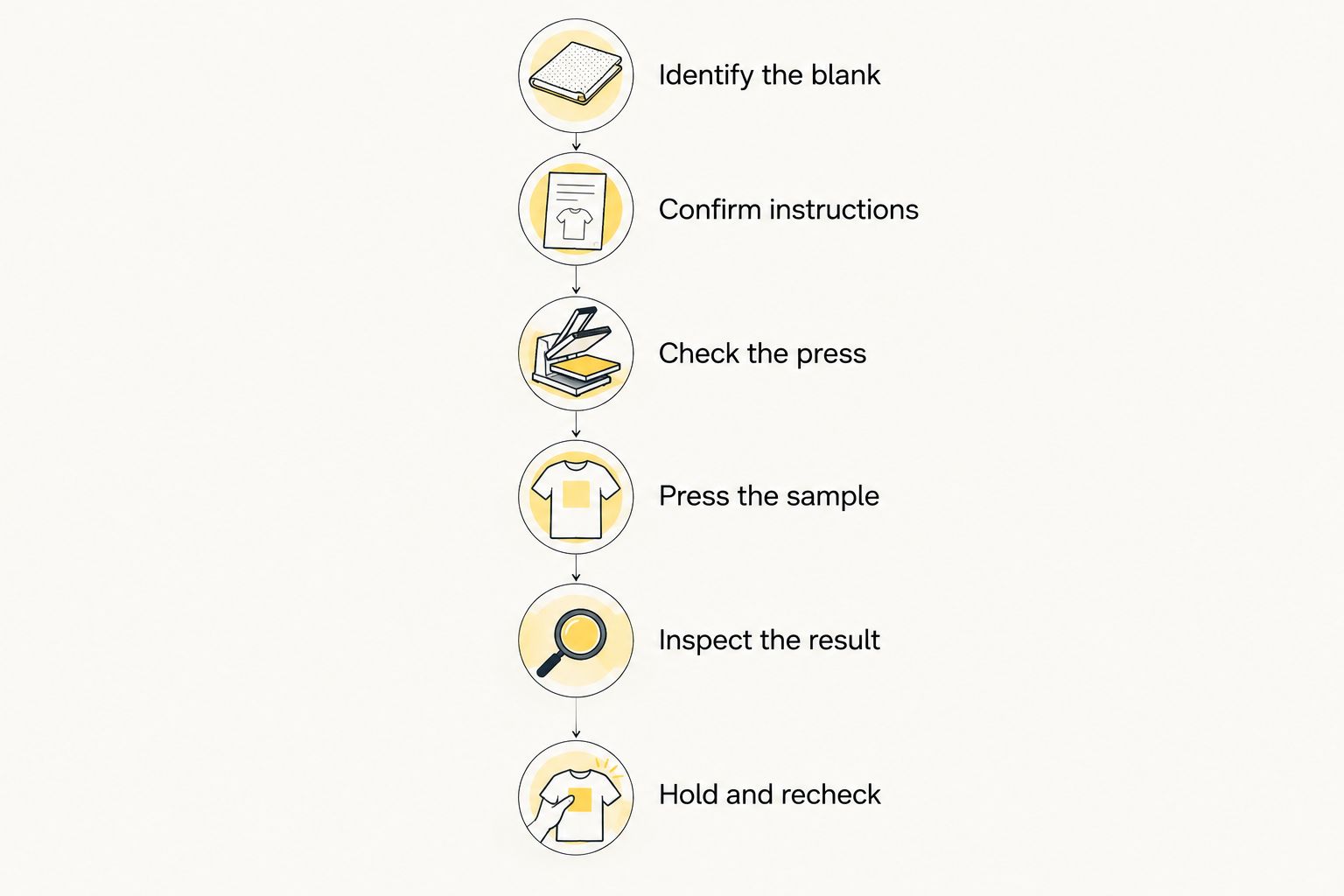
Use 2 inspection stages at minimum in your internal checklist: after cooling and after the agreed hold interval. That is a process recommendation, not a promise that every migration problem will appear within a fixed window.
Keep the failed sample. A physical comparison helps the supplier distinguish garment dye contamination from an artwork, ink, or application defect.
What should you change if the test shows bleeding?
Stop the run and isolate the failed combination. Do not add more heat simply because the decoration looks wrong; additional heat does not remove migrated garment dye.
Choose the correction according to the failure. These approaches address different parts of the process and are not interchangeable.
| Approach | Best for | Benefit | Limitation |
|---|---|---|---|
| Supplier-approved lower-temperature application | A transfer system designed to bond at reduced heat | Reduces thermal exposure | Arbitrarily lowering settings can compromise adhesion |
| Migration-control transfer system | A garment that discolors a standard transfer | Addresses dye movement through transfer construction | Requires supplier confirmation and garment testing |
| Alternative blank | A style or color that repeatedly fails qualification | Removes the problematic garment from the job | Requires customer approval and a fresh decoration test |
| Revised heat sequence | A process with unnecessary repeated pressing | Removes avoidable heat exposure | Does not make an unsuitable transfer dye-resistant |
Change 1 process variable per trial when troubleshooting. That recommendation keeps the result interpretable: if you change the blank, transfer, temperature, and dwell together, you cannot identify which change solved the problem.
Record the successful combination as a complete recipe. Your 2026 press log should identify the transfer, garment, settings, peel method, finishing sequence, and inspection outcome—not simply say that polyester passed.
Is lowering the heat enough to prevent dye migration?
Lowering heat is not a universal fix for polyester dye migration. It helps only when the transfer can still form the required bond under the revised application conditions.
The adhesive needs its specified application window. Pressing below that window to preserve white artwork can exchange a color problem for a peeling problem.
Ask the supplier for an approved low-temperature process or a transfer intended for migration-prone fabric. Then repeat both color-stability and adhesion checks; neither result substitutes for the other.
Do not compensate for a temperature change by inventing a longer dwell. Temperature and time interact, and an improvised adjustment changes the garment's heat exposure again.
Can you fix a DTF transfer after polyester dye has migrated?
Do not treat reheating as a cure for migrated dye. Once garment color has contaminated the decoration, another press does not restore the original white ink.
Covering the defect with another transfer also needs qualification. It adds another layer and another heat cycle without establishing that the underlying dye movement has stopped.
For a customer order, separate salvage testing from approved production. Keep failed garments out of the finished stack, document the defect, and establish a passing blank-and-transfer combination before restarting.
If replacement blanks are required, test them too. A matching catalog color name does not prove that a new garment supply will behave identically under the press.
Choosing ready-to-press transfers for polyester work
DTF2GO is best suited to apparel decorators and print shops buying custom, ready-to-press DTF transfers rather than producing transfers in-house. Its PRINT & CUT DTF Transfers provide a cut-to-size format for that workflow.
The production benefit is straightforward: you receive transfers prepared for heat application instead of printing and cutting them yourself. The limitation is equally important: ready-to-press describes the supplied format, not automatic dye-migration protection for every polyester blank.
When discussing a polyester order with DTF2GO, identify the garment manufacturer, style, color, composition, and whether the fabric is sublimated. Ask which application instructions apply and whether the proposed transfer is appropriate for the migration risk.
Keep the approval specific. Qualification of a white logo on one jersey does not establish a guarantee for every athletic garment in your catalog.
What should your polyester approval record contain?
Build a usable job record, not a collection of press photos without context. A photograph shows appearance; it does not identify the fabric, heat history, or inspection timing unless you record those details alongside it.
For repeat orders in 2026, retain:
- Garment manufacturer, style, color, composition, and available lot details.
- Transfer identification and the supplier instructions used.
- Actual application settings, peel method, and finishing sequence.
- Inspection dates and observations before and after holding.
- Laundering procedure and the resulting color and adhesion observations.
- The approved sample or a clearly identified retained reference.
Requalify when a relevant input changes. A new blank, transfer construction, or application instruction changes the combination you previously approved.
FAQ
Can DTF transfers bleed on polyester even when they stick properly?
Yes. Adhesion and dye migration are separate performance checks: a firmly bonded transfer can still become tinted by garment dye. Inspect both before approving production.
Why did my white DTF print turn pink on a red polyester shirt?
Red garment dye migrating into the white decoration is a likely cause. Compare the applied print with an unapplied transfer and test the exact garment with your supplier's recommended system.
Does every polyester shirt need a dye-blocking DTF transfer?
No. Polyester composition alone does not establish that a garment requires a dye-blocking transfer. Qualify the exact blank, color, transfer, and application process.
What's the safest temperature for pressing DTF onto polyester?
There is no universal safe temperature for every polyester garment and DTF transfer. Use the transfer supplier's approved instructions, confirm the garment's restrictions, and verify the finished result.
Can polyester dye migration appear after the transfer cools?
Yes. A transfer that looks acceptable immediately after pressing can show discoloration later. Include a documented hold and reinspection step rather than approving the job at peeling.
Are DTF2GO ready-to-press transfers automatically dye blockers?
Ready-to-press describes the application format, not verified dye-blocking performance. Confirm suitability for your polyester garment with DTF2GO and test the proposed combination before production.
Can I prevent dye migration by pressing for less time?
Reducing dwell without supplier approval is not a reliable prevention method. Insufficient application can weaken adhesion, so use an approved process and evaluate color stability separately.
One last thing
The most useful migration test is the one that preserves a comparison. Keep an unapplied transfer, an undecorated garment reference, and the pressed sample clearly identified so you can locate where the color changed.
For your next polyester job in 2026, make that comparison part of release approval. A print that looks good on the press table is a promising sample—not a completed qualification.
Related guides

Can you screen print over a DTF transfer design?
You can screen print over a DTF transfer design only when the screen ink is compatible with the transfer surface and the complete decoration survives curing and laundering tests. Do not treat an applied DTF transfer as an ordinary blank garment: you are printing onto an existing decoration, and the additional curing cycle must suit the transfer, screen ink, and fabric.
- Screen print over DTF transfer designs only after validating ink adhesion, curing compatibility, and wash performance.
- Separate print areas avoid direct ink-on-transfer contact but still require heat compatibility checks.
- DTF2GO DTF transfers suit decorators ordering ready-to-press artwork; they do not establish compatibility with an added screen-printed layer.
- A clean-looking print is not proof that the layered decoration will survive laundering.
Why this matters
A hybrid garment and a layered print are different production jobs. Screen printing a back graphic and applying a DTF chest logo keeps the decorations apart; screen printing directly across that chest logo creates another bonding surface to evaluate.
For your 2026 production plan, distinguish those jobs before approving artwork. The broader DTF printing versus screen printing comparison helps you choose a primary method; combining the methods requires a separate qualification process.
The practical question is not whether a squeegee can deposit ink on the design. It is whether the finished stack remains attached, flexible, and visually acceptable after the entire production and care sequence.
Can you screen print over a DTF transfer design?
Yes, conditionally—not as an assumed production-compatible process. The screen ink must adhere to the exposed DTF print surface, cure according to its manufacturer's requirements, and remain compatible with the underlying transfer and garment.
Use the layout to decide what you actually need to validate:
| Decoration approach | Best for | Advantage | Limitation | Production recommendation |
|---|---|---|---|---|
| Screen ink directly over DTF | A deliberately layered effect with supplier-supported materials | Places the screen-printed element directly on the existing design | Requires validation of ink-to-transfer adhesion and the complete heat sequence | Test before approval |
| Screen print and DTF in separate areas | Artwork that does not require overlap | Avoids direct bonding between screen ink and the transfer surface | Existing decorations still need protection from subsequent processing | Prefer when the layout allows |
| Rebuild the artwork with one decoration method | A unified graphic without a necessary layered effect | Removes the ink-on-transfer compatibility question | Requires revised artwork and a new production setup | Prefer for an unqualified combination |
No table can approve a specific ink and transfer pairing. Approval belongs to the actual combination of materials, equipment, artwork coverage, and processing conditions you intend to use.
What surface does the screen ink touch?
After you apply a DTF transfer and remove its carrier, the exposed decoration is not bare textile. Screen ink deposited over that area contacts the transfer's printed surface rather than the garment fibers.
That distinction changes the adhesion question. An ink described for cotton or polyester is not automatically approved for printing onto a finished DTF decoration, even when that decoration sits on a compatible shirt.
A cured print also does not automatically accept another ink layer. Cure and intercoat adhesion are separate requirements. Ask the screen ink manufacturer about the actual substrate: an applied DTF print, not simply the fabric underneath it.
Direct overlap: qualify the complete print stack
Choose direct overlap only when the design genuinely needs it. A border crossing a transfer edge, a screen-printed accent over a graphic, and a complete overprint are different test conditions because they place ink on different surfaces and boundaries.
Send your ink supplier the transfer information and proposed processing sequence. Request guidance on substrate compatibility, curing requirements, and an appropriate adhesion evaluation; do not substitute a general textile-ink recommendation.
Your 2026 job record should identify the exact ink, any approved additives, the transfer, the garment, and the order of operations. A successful sample with a different blank or ink formulation does not qualify the proposed job.
Inspect the overlap boundary closely. If the screen print crosses from fabric onto the DTF design, evaluate both areas and the transition rather than judging the graphic as a single flat surface.
Separate print areas: avoid the added bonding interface
Keeping screen ink off the DTF design removes the need for that ink to bond directly to the transfer. This is the preferred layout when direct overlap adds no necessary visual effect.
It does not remove the processing question. A transfer already on the garment still experiences any later heat exposure that reaches it, and a cured screen print still needs evaluation if subsequent transfer application exposes it to heat and pressure.
Plan the sequence around the instructions for both decoration systems. Protect existing decoration as directed by its supplier, and check whether your platen arrangement and garment loading keep unrelated areas out of the application zone.
Do not assume that reversing the order solves every problem. Screen printing first changes which decoration experiences the later operation; it does not establish compatibility by itself.
Why screen-print-over-DTF results vary
The result depends on the materials and processing sequence, not on the method names alone. Evaluate these factors before approving a hybrid job:
- Exposed transfer surface: Screen ink must bond to the finished decoration where the artwork overlaps. Fabric compatibility does not answer this question.
- Screen ink chemistry: Plastisol, water-based, and specialty formulations have different processing requirements. Use guidance for the exact ink, not its broad category alone.
- Complete heat sequence: Include transfer application, screen ink curing, flash exposure where applicable, and any specified finishing press. Review the sequence as a whole.
- Garment construction: Fiber content, stretch, surface treatments, and heat sensitivity belong in the evaluation. Use the actual production blank.
- Artwork coverage: A small accent and a broad overprint create different decorated areas. Test the intended overlap and the boundary between methods.
- Care conditions: Judge the finished combination under the intended garment-care instructions. Initial appearance does not establish laundering performance.
There is no universal temperature or dwell time for this combination. Use the material manufacturers' instructions, and do not lower a screen ink's required cure simply to avoid exposing the transfer to heat.
How do you test screen printing over a DTF transfer?
Use a controlled sample process before committing customer garments. For a 2026 qualification run, document the actual materials and processing conditions so you can repeat the approved result rather than rely on memory.
- Confirm materials. Identify the garment, transfer, screen ink, and any ink additives. Ask the relevant suppliers whether the proposed layered use has material-specific support.
- Map the sequence. Write down every application, flash, cure, cooling, and finishing stage that applies. Check the instructions for each material against the complete sequence.
- Print samples. Reproduce the intended artwork coverage, overlap boundaries, garment loading, and equipment settings. Include reference samples of each decoration method alone on the same blank.
- Inspect adhesion. Allow the decoration to cool and follow the applicable evaluation guidance. Check the overprint, transfer edges, fabric transition, flexibility, and visible changes.
- Wash and review. Follow the intended care instructions and inspect the layered sample against the reference decorations. Approve only the tested combination and retain the job record.
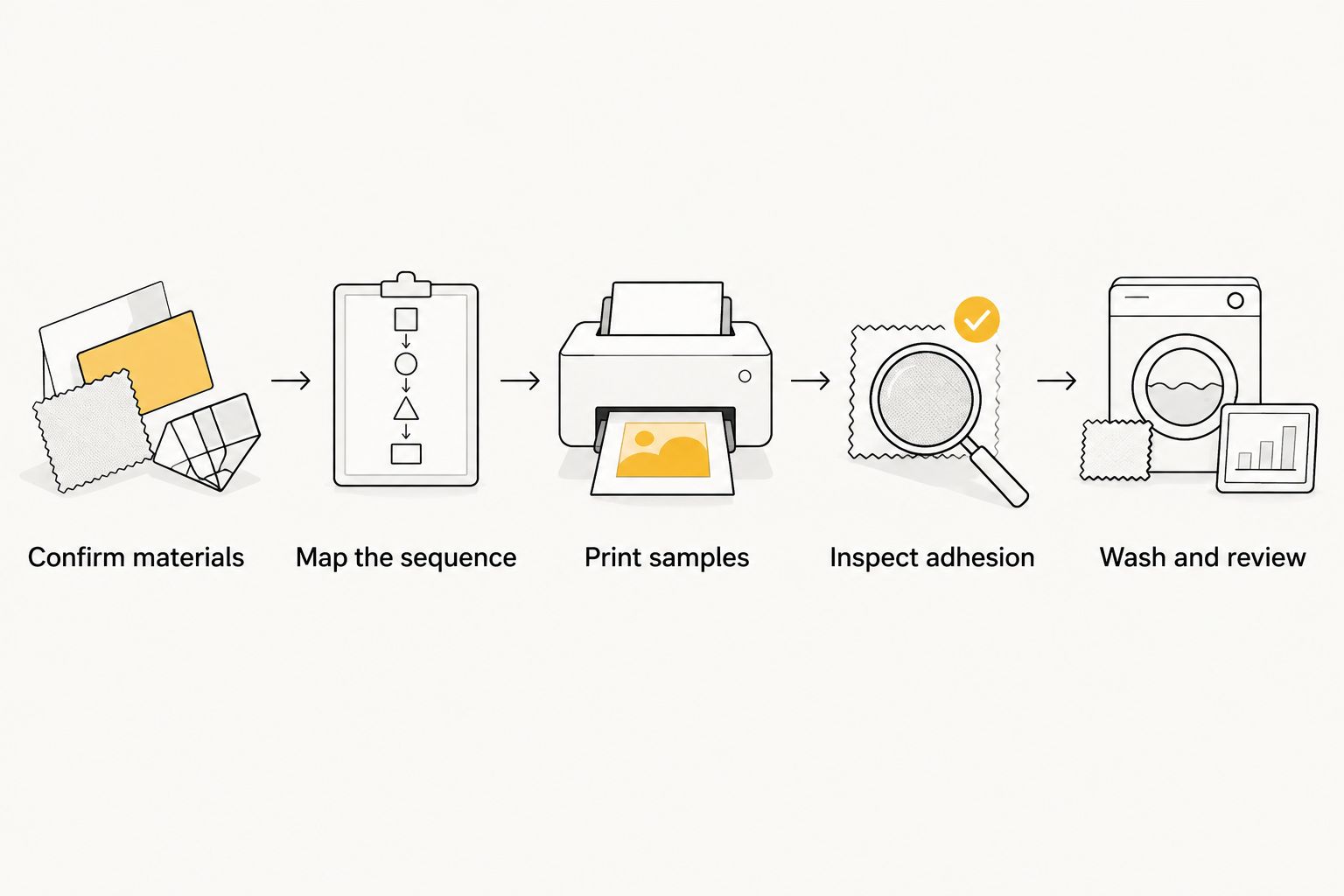
A reference sample helps you isolate the failure. If the screen-printed reference performs acceptably but the overprint separates from the DTF surface, investigate the added interface rather than assuming the fabric is responsible.
If the DTF-only reference changes after the proposed additional heat exposure, investigate that exposure before continuing. Do not compensate for an unexplained failure by changing several settings at once; preserve a clear record of what changed and why.
What should count as a failed sample?
Reject a sample that shows separation between layers, transfer-edge lifting, unacceptable cracking, tackiness, or a visible finish change outside the customer's approved standard. Treat defects at the overlap boundary as production defects, not as an unavoidable feature of hybrid decoration.
A sample also fails qualification when you cannot reproduce its processing conditions. An attractive result without a usable job record is not a repeatable production specification.
Keep the approval criteria in your 2026 job documentation. Changing the ink, blank, transfer, artwork coverage, or sequence calls for reviewing whether the existing approval still applies.
When ready-to-press DTF is the cleaner production choice
If you only need to add a logo, correct artwork, or reproduce a multicolor image, first ask whether a screen-printed overlayer is necessary. Revising the artwork or using separate placements avoids introducing an ink-on-transfer interface solely to rescue the layout.
DTF2GO DTF transfers are best for apparel decorators and print shops that want custom, ready-to-press artwork. Its PRINT & CUT DTF Transfers provide a cut-to-size option; that format does not establish compatibility with screen ink applied afterward.
The advantage is a ready-to-press transfer workflow. The limitation for this particular job is unchanged: choosing a transfer supplier does not qualify an additional decoration layer, and you still need to follow the transfer's application instructions.
For a 2026 reorder, preserve the approved artwork and application record. Do not add an unqualified overprint merely because the underlying transfer order is familiar.
Can I use plastisol ink over a DTF design?
Plastisol is not an automatic approval for printing over a DTF design. Confirm that the exact ink is suitable for the exposed transfer surface and that its required cure is compatible with the complete decorated garment.
Do not judge cure from touch alone or assume that a heat press setting proves the ink reached its required curing conditions. Follow the ink manufacturer's verification guidance.
Can I screen print beside a DTF transfer instead?
Yes, separate placements avoid direct screen-ink-to-DTF bonding. You still need to review the production sequence, because later heat exposure or press contact can affect an existing decoration.
Keep the test representative of the actual layout. Moving the sample graphic away from heat while exposing the production graphic would invalidate the comparison.
Is printing over DTF a reliable way to fix a mistake?
Do not use an unqualified screen overprint as a production repair. Covering an incorrect design adds compatibility and appearance requirements without removing the original decoration.
Compare remaking the garment with revising the decoration plan before attempting salvage. Obtain approval for the actual finished sample rather than promising an invisible correction.
FAQ
Can you screen print over a DTF transfer on a cotton shirt?
Only after qualifying the screen ink on the transfer surface and testing the complete process. A cotton shirt does not make an applied DTF design equivalent to bare cotton.
What is the best ink for screen printing over DTF?
There is no universal ink recommendation for every DTF transfer. Ask the ink manufacturer about the exact applied transfer surface and proposed curing sequence.
Will curing screen ink damage an existing DTF transfer?
Compatibility depends on the transfer, garment, and complete heat exposure. Confirm the materials' processing requirements and test the actual sequence before production.
Can I use water-based screen ink over a DTF print?
Do not assume water-based screen ink is compatible with a finished DTF surface. Obtain formulation-specific guidance and validate adhesion, curing, and laundering on the complete garment.
Should I screen print before or after applying DTF?
Neither order is universally approved. Choose a sequence supported by the materials' instructions, then test how the later operation affects the existing decoration.
Does DTF2GO approve screen printing over its transfers?
A ready-to-press transfer description does not establish approval for screen printing over it. Request material-specific guidance before planning an overlapping decoration.
Does a successful wash test approve every future hybrid print?
No. An approval applies to the tested materials and process; changes to the ink, transfer, garment, artwork, or processing sequence require review.
One last thing
A decoration can remain attached to the shirt while the added ink separates from the decoration. Inspect the interface between the methods, not just whether the overall design stays on the garment.
Before your next hybrid job, mark every place where screen ink touches DTF in the artwork proof. If those overlaps serve no necessary design purpose, remove them before production rather than trying to qualify an avoidable interface.
Related guides

Are DTF gang sheets cheaper than individual transfers?
DTF gang sheets are cheaper than individual transfers only when the savings on the order exceed your layout, cutting, sorting, and waste costs; there is no universal winner in 2026. Compare cost per usable transfer—not cost per sheet—and include the labor needed to get each design ready for the press.
- DTF2GO offers DTF gang sheets and cut-to-size transfers; choose by production workflow, not format alone.
- For dtf gang sheets vs individual transfers cost, compare identical artwork, quantities, usable yield, and preparation labor.
- Gang sheets suit consolidated layouts; individual transfers remove the need to separate designs from a shared sheet.
- A full sheet is not economical if its extra designs have no confirmed use.
Are DTF gang sheets cheaper than individual transfers?
Gang sheets win only when their total preparation-adjusted cost per usable transfer is lower. Individual transfers win when eliminating sheet separation and simplifying job handling offsets any difference in the order total.
Use the same artwork dimensions, design quantities, and delivery requirements for both quotes. Otherwise, you are comparing different jobs rather than different ways to supply the same job.
| Format | Best for | Main advantage | Main drawback | What decides the cost comparison |
|---|---|---|---|---|
| Print-ready DTF gang sheet | Approved designs that fit a consolidated layout | Combines designs into a shared sheet layout | Requires layout preparation, separation, and sorting | Usable output after preparation labor and waste |
| Individual cut-to-size DTF transfers | Jobs where separate transfers simplify production | Removes the task of separating designs from a shared sheet | Does not consolidate designs into a shared layout | Order total compared with the labor avoided |
Neither format automatically changes the artwork you need to press. The comparison concerns how you order, receive, and prepare that artwork for production.
Why this matters
A transfer order sits inside a larger apparel workflow. Someone still has to check artwork, count designs, match transfers to garments, and prepare the press station. A purchasing decision that ignores those tasks leaves part of the job cost uncounted.
For your 2026 costing worksheet, separate supplier charges from internal preparation costs. Keep pressing and garment handling consistent between the alternatives unless your actual workflow shows a difference.
DTF2GO DTF transfers are best for apparel decorators, promotional product businesses, and print shops sourcing ready-to-press artwork. The format decision still belongs to the job: consolidated sheets and cut-to-size transfers serve different preparation needs.
Gang sheets: best for approved, consolidated layouts
Choose gang sheets when your approved designs fit together and your shop has a clear process for separating and organizing them. Repeated artwork and compatible job batches give you a defined layout to evaluate—not a reason to assume savings before checking the quote.
The advantage is consolidation. You arrange multiple designs within a shared sheet rather than treating every design as a separate physical piece at the ordering stage.
The drawback is preparation. A tightly arranged sheet still needs practical cutting paths, identifiable designs, and a reliable count before it reaches production. Packing artwork closely without considering separation trades layout space for handling difficulty.
Before choosing this format, check:
- Every design has an approved size and quantity.
- The layout leaves workable separation paths.
- Someone owns the cutting and sorting task.
- Extra artwork has a confirmed production use.
- The resulting preparation cost belongs in the estimate.
Choose gang sheets when the completed layout and measured preparation work produce the lower job cost. Do not select them solely because a sheet looks full.
Individual transfers: best for reducing sheet preparation
Choose individual transfers when receiving separate designs fits your job handling better than receiving a shared sheet. This is a workflow choice, not an admission that your order is too small for gang sheets.
Cut-to-size transfers remove the need to separate the artwork from a gang sheet yourself. You still need to verify quantities, identify designs, and match each transfer to the correct garment.
The trade-off is that you are not arranging the job into a shared sheet layout. Compare the actual order total with the work that arrives already completed; do not assume either format carries a fixed premium.
DTF2GO produces custom cut-to-size, ready-to-press DTF heat transfers. For that option, assess the value of receiving separate transfers against your own preparation process rather than assigning an unsupported labor-saving figure.
Choose individual transfers when avoiding sheet preparation outweighs the alternative order's savings. Measure that difference using your shop's work, not another decorator's estimate.
How to calculate the real cost per usable transfer
Use the same calculation for both formats in 2026. The result should describe a completed preparation task: correctly counted transfers ready for the next production stage.
Preparation-adjusted cost per usable transfer = total transfer acquisition and preparation cost divided by usable transfers for the job.
Acquisition cost includes the quoted order and applicable delivery charges. Preparation cost includes the internal work that differs between the formats. Avoid counting the same expense twice.
Lock the job
Record the approved artwork, final dimensions, quantities, and garment placements. Keep that specification unchanged while comparing formats.
A back graphic and a chest graphic are separate production requirements even when they belong to the same shirt. Preserve the required count for each placement rather than comparing only the overall number of printed designs.
Compare quotes
Build both options around the locked specification. Check the current configuration and checkout details rather than treating a product listing as a completed job quote.
Confirm whether the quote covers your finished layout or requires additional artwork preparation. If you change dimensions or quantities to make a layout fit, you have changed the comparison and need to document it.
Measure preparation
Track the tasks that differ: layout work, sheet separation, counting, sorting, and job labeling. Record your actual working time rather than borrowing an assumed cutting rate.
Use your shop's labor-cost method consistently. If layout preparation sits with prepress and cutting sits with production, include both departments instead of charging only the work performed beside the heat press.
Count usable output
Count transfers that meet the job specification and have a planned use. Exclude incorrect sizes, damaged pieces, and speculative filler artwork from the current job's usable output.
Keep reprints visible. When a preparation error requires replacement transfers, include the replacement expense and additional handling in the job record rather than leaving them outside the comparison.
Choose the format
Divide each option's total by its usable output. Then check that the selected format fits your production schedule and handling process.
The lower calculated cost wins the financial comparison. If you choose the other format for operational reasons, record that decision explicitly instead of describing it as the cheaper option.
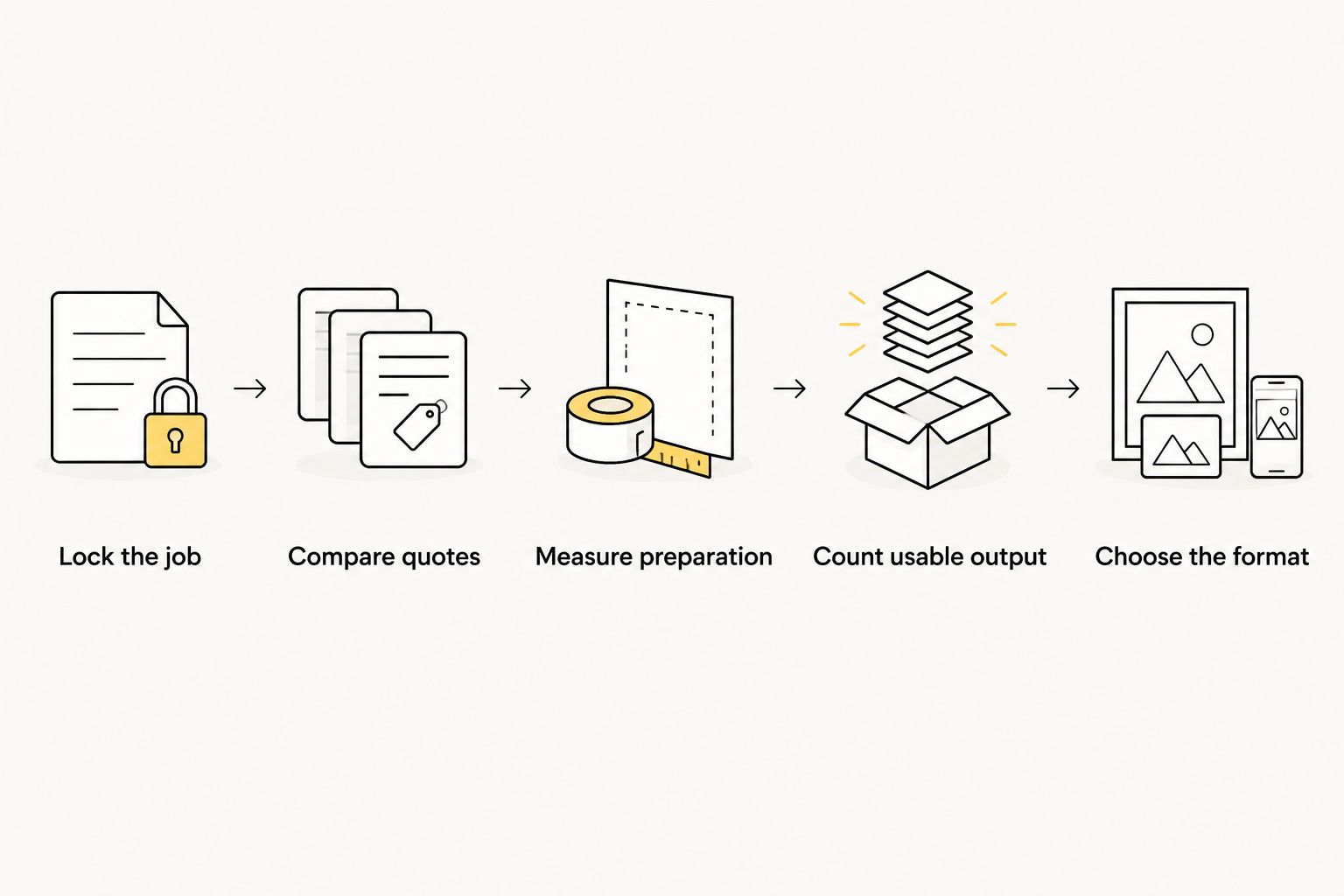
Why DTF gang sheet and individual transfer costs vary
The format name does not determine the result. These factors change the comparison without requiring a blanket claim that either option is always cheaper:
- Artwork dimensions: Final design sizes determine how the required artwork fits within a sheet. Compare identical dimensions rather than shrinking designs to improve the apparent result.
- Required quantities: Count the designs the job actually needs. Additional copies are not savings unless they replace a planned purchase or serve a confirmed order.
- Layout preparation: Building, checking, and revising a shared layout is work. Include it even when the person preparing the file also owns the business.
- Separation and sorting: Cutting designs apart and organizing them by job add handling steps. Individual transfers still require verification, but not separation from a shared sheet.
- Usable yield: A printed design contributes to the current job only when it is correct and needed. Waste belongs in the numerator through its cost, not in the denominator as useful output.
- Delivery and replacements: Compare applicable delivery charges and any replacement orders consistently. Do not assume matching delivery costs without checking the actual quotes.
Keep these inputs separate on your 2026 worksheet. That makes the reason for the result visible and lets you update the comparison when the job specification changes.
Does filling every gap make a gang sheet cheaper?
No—filling space improves the current job's economics only when the added artwork has a real use and the total cost comparison supports it. An extra logo does not become valuable merely because it fits beside an approved design.
Before adding filler artwork, assign it to a confirmed job or a documented replenishment need. Otherwise, keep its value outside the current order calculation.
There is also a handling trade-off. More mixed designs mean more items to identify and sort, so assess layout density together with the preparation process rather than as an isolated goal.
Do individual transfers eliminate preparation labor?
No—individual transfers eliminate gang-sheet separation, not all preparation work. Your team still needs to check the order, confirm counts, and organize transfers for the correct garments.
Compare the tasks that actually disappear. Charging every preparation task to gang sheets while treating individual transfers as requiring no handling creates a biased result.
Should you combine customer orders on a gang sheet?
Combine customer orders only when their artwork is approved and your sorting process preserves job accuracy. Shared sheet space does not remove the need to track ownership, quantities, sizes, and garment placement.
Keep each customer's required output visible before arranging the layout. If a late revision changes a shared file, check the affected designs before ordering rather than assuming the rest of the layout remains correct.
Keep the comparison fair at the production bench
A useful 2026 comparison follows the job past delivery. Record what arrived, what preparation was required, and what reached the press station correctly.
Do not attribute every production problem to the ordering format. An artwork error, an incorrect garment allocation, and a cutting error have different causes; separate them so the next purchasing decision addresses the right task.
Use a short job record with these fields:
- Approved artwork and quantities.
- Format ordered and acquisition cost.
- Layout, separation, and sorting time.
- Correct transfers assigned to production.
- Waste and replacement work.
- Final preparation-adjusted cost per usable transfer.
Retain the completed layout alongside the record. For a repeat job, that lets you distinguish reusable preparation work from work that must happen again.
FAQ
Are DTF gang sheets always cheaper than individual transfers?
No—DTF gang sheets are cheaper only when their total acquisition and preparation cost per usable transfer is lower. Include layout, cutting, sorting, and waste in the comparison.
What's the fairest way to compare dtf gang sheets vs individual transfers cost?
Compare cost per usable transfer for identical artwork dimensions and quantities. Use current quotes and include the internal preparation work required by each format.
Are individual cut-to-size transfers ready to press?
DTF2GO supplies custom cut-to-size, ready-to-press DTF heat transfers. Receiving separate transfers removes gang-sheet separation, but you still need to verify the order and organize production.
Does unused space make a gang sheet a bad choice?
Unused space alone does not determine whether a gang sheet is the better choice. Compare the completed job's total cost rather than judging the layout only by how full it looks.
Should I count spare logos as usable transfers?
Count spare logos toward a confirmed future requirement, not automatically toward the current job. Keep speculative extras outside the current job's usable-output calculation.
Do I include heat-press labor when comparing the formats?
Keep heat-press labor consistent when the pressing workflow is identical. Add a format-specific difference only when your actual process establishes one.
How do I know when to switch from individual transfers to gang sheets?
Switch when a like-for-like job comparison shows a lower preparation-adjusted cost and the gang-sheet workflow fits your shop. Order quantity alone does not establish the answer.
One last thing
The cheapest layout is not necessarily the fullest layout. A sheet filled with designs you cannot assign to production improves its appearance, not your job economics.
Before placing your next order, reconcile the layout against the approved job quantities. That final check connects every printed design to a production need—and keeps the 2026 comparison grounded in useful output.
