


Best overall workflow: PRINT & CUT DTF Transfers. Best for approved sheet layouts: 31" DTF Gang Sheet UPLOADER. Best for initial evaluation: DTF Transfers Samples. This 2026 guide ranks DTF2GO ordering options by their role in sample-to-bulk approval—not by an unverified claim that one format prints more consistently than another.
- For dtf transfers ranked by sample to bulk consistency, prioritize approved artwork and repeatable pressing over ordering format.
- DTF2GO PRINT & CUT DTF Transfers is the default for decorators buying cut-to-size, ready-to-press transfers.
- 31-inch DTF Gang Sheet UPLOADER suits shops submitting an approved, print-ready sheet layout.
- DTF Transfers Samples supports initial evaluation; approve your actual artwork before releasing bulk production.
Why this matters
A good-looking sample answers a narrow question: does that transfer work on that garment under those application conditions? It does not establish that a different logo, fabric, print size, or production order will produce the same result.
For your 2026 buying decision, separate ordering convenience from evidence of repeatability. Cut-to-size transfers and gang sheets describe how you order and handle graphics; sample-to-bulk consistency requires comparing the approved reference with the production result.
DTF2GO is best for apparel decorators and print shops buying custom, ready-to-press DTF transfers. Choose the ordering format around your production process, then qualify the actual job before scaling it.
What makes the best DTF transfers for repeat orders?
Use these criteria before choosing an ordering option:
- Artwork continuity: Keep the approved file, dimensions, and revision attached to the reorder.
- Color reference: Compare production garments with the approved physical sample under the same lighting.
- Detail retention: Inspect small lettering, fine outlines, open spaces, and white edges—not just large color areas.
- Application control: Record the transfer instructions, press settings, peel procedure, and garment used during approval.
- Production handling: Choose individual transfers or gang sheets according to how your operators separate, identify, and press designs.
- Reorder traceability: Save the artwork, order reference, garment details, and approval record together.
These criteria rank workflow suitability. They are not laboratory scores, supplier defect rates, or guarantees about future batches.
DTF transfer options at a glance
The 2026 ranking below follows the path from repeat production to initial evaluation. Product widths identify the named ordering options; they do not establish usable print area or a quality advantage.
| Rank and option | Best for | Standout feature | Key limitation |
|---|---|---|---|
| 1. PRINT & CUT DTF Transfers | Individual, cut-to-size production orders | Cut-to-size ordering format | Does not replace artwork-specific approval |
| 2. 31" DTF Gang Sheet UPLOADER | Shops with an approved sheet layout | Print-ready gang sheet submission | Requires a prepared sheet file |
| 3. 32" DTF Gang Sheet BUILDER | Shops choosing a builder-based ordering route | Gang sheet builder format | A revised layout needs another file check |
| 4. 32" Dynamic Gang Sheet | Buyers evaluating the separately listed dynamic option | Distinct gang sheet product | Product name alone does not establish its workflow capabilities |
| 5. DTF Transfers Samples | Initial transfer evaluation | Dedicated sample product | Samples do not establish repeat-batch performance |
1. PRINT & CUT DTF Transfers: best for individual production orders
PRINT & CUT DTF Transfers is the default choice when your job calls for individual, cut-to-size graphics rather than a sheet layout. DTF2GO produces custom cut-to-size, ready-to-press transfers for apparel decorators, promotional product businesses, and print shops.
For sample-to-bulk approval, keep the approved graphic size and artwork revision unchanged. Cut-to-size ordering addresses how transfers reach your press station; it does not establish that color, detail, or garment performance has already passed inspection.
PRINT & CUT DTF Transfers pros:
- Matches an individual-transfer ordering process.
- Suits jobs specified by separate graphic dimensions.
- Provides a direct option for buyers seeking cut-to-size transfers.
PRINT & CUT DTF Transfers cons:
- Still requires a physical approval for the actual garment.
- Does not eliminate the need to identify similar artwork revisions.
Best for: Decorators who want individual transfers as their production format.
Before reordering, match the production file to the approval record rather than relying on the customer's job name. A familiar filename is not an artwork specification.
Verdict: Buy for cut-to-size production after approving the job-specific reference.
2. 31" DTF Gang Sheet UPLOADER: best for approved sheet layouts
31" DTF Gang Sheet UPLOADER is the ordering route for a prepared, print-ready gang sheet. The named format is 31 inches; confirm the current file requirements before preparing your production layout.
This option fits a shop that controls its sheet artwork before submission. Keep the approved layout and its source graphics together, so the production file remains identifiable when a customer returns for another run.
31" DTF Gang Sheet UPLOADER pros:
- Fits an existing print-ready sheet workflow.
- Lets the shop retain the submitted layout as a reorder reference.
- Supports a clear distinction between the approved file and later revisions.
31" DTF Gang Sheet UPLOADER cons:
- Requires sheet preparation before submission.
- A layout check does not replace inspection of pressed garments.
Best for: Print shops that already prepare and approve their gang sheet files.
Check every graphic at its intended output size before release. A sheet preview is useful for placement, but small lettering and fine outlines deserve their own inspection.
Verdict: Buy when your print-ready layout is approved and archived.
3. 32" DTF Gang Sheet BUILDER: best for builder-based ordering
32" DTF Gang Sheet BUILDER provides a builder-named route for gang sheet orders. Its listed format is 32 inches; that product name does not establish the printable width, supported file types, or saved-layout features.
Choose this route when a builder-based ordering process fits your shop. Treat the resulting layout as a production file: verify graphic dimensions, quantities, and artwork versions before approving it.
32" DTF Gang Sheet BUILDER pros:
- Offers an alternative to the print-ready uploader route.
- Fits buyers seeking a gang sheet builder.
- Gives sheet preparation a defined checkpoint before ordering.
32" DTF Gang Sheet BUILDER cons:
- A newly arranged sheet needs another layout inspection.
- The builder format does not establish better batch consistency.
Best for: Decorators choosing a builder-based gang sheet workflow.
For repeat orders in 2026, compare the final layout against the original approval—not just the artwork folder. Resizing or substituting a graphic changes the job even when the sheet looks familiar.
Verdict: Buy after checking the builder requirements and approving the final layout.
4. 32" Dynamic Gang Sheet: best for evaluating another sheet option
32" Dynamic Gang Sheet is a separately listed gang sheet product with a 32-inch designation. Evaluate its current ordering instructions before selecting it for an established production process.
Do not interpret “dynamic” as proof of automated nesting, saved reorders, color matching, or production integrations. Those capabilities need explicit confirmation; the product title alone does not establish them.
32" Dynamic Gang Sheet pros:
- Provides another named gang sheet option to evaluate.
- Gives buyers a distinct product to compare with the builder and uploader.
- Supports a purchasing discussion centered on the required sheet workflow.
32" Dynamic Gang Sheet cons:
- The title does not explain its operational differences.
- No sample-to-bulk performance advantage follows from its name.
Best for: Buyers checking whether this option fits their documented ordering requirements.
Keep the approval standard unchanged if you switch sheet products. A different ordering interface is not a reason to discard your reference garment or skip incoming inspection.
Verdict: Hold until the ordering process matches your production requirements.
5. DTF Transfers Samples: best for initial evaluation
DTF Transfers Samples is the starting point for examining a physical transfer before committing to a production workflow. Use samples to assess the supplied graphics on an appropriate test garment, following the accompanying application instructions.
A sample evaluation and an artwork approval serve different purposes. Unless a sample reproduces your actual design at the intended size, it does not settle questions about that logo's fine detail, color relationships, or coverage.
DTF Transfers Samples pros:
- Provides a dedicated sample product for initial evaluation.
- Supports hands-on inspection of a physical transfer.
- Creates a starting point for press-side assessment.
DTF Transfers Samples cons:
- Does not establish consistency across later production batches.
- Does not replace approval of different customer artwork.
Best for: First-time buyers assessing the transfer before qualifying a specific job.
Use the sample stage to decide what needs closer inspection. Then obtain approval for the production design rather than treating an unrelated sample as the final standard.
Verdict: Buy for initial evaluation; hold bulk release until the actual job is approved.
The following products cover the main evaluation-to-production decision: samples, individual transfers, and a print-ready sheet route. Select the format that matches your preparation process.


How to approve a sample before releasing bulk production
Use this sequence for your 2026 production approvals. The aim is to preserve a reference you can actually reproduce—not merely a photograph that looked acceptable on a phone.
Lock artwork
Save the approved artwork revision and intended print dimensions. Include the customer's critical color and detail requirements in the job record, and resolve discrepancies before ordering production transfers.
Match garments
Use the intended garment style, fabric composition, and color for approval. If the bulk order includes different substrates, evaluate those separately rather than assuming the original approval covers every garment.
Record pressing
Follow the transfer's application instructions and document the settings and peel procedure used for the approved result. Keep the press setup identifiable so a later comparison does not mix transfer differences with application changes.
Inspect production
Compare incoming production with the retained reference before committing the full garment order. Examine color, detail, edges, adhesion, and hand feel; investigate differences before continuing.
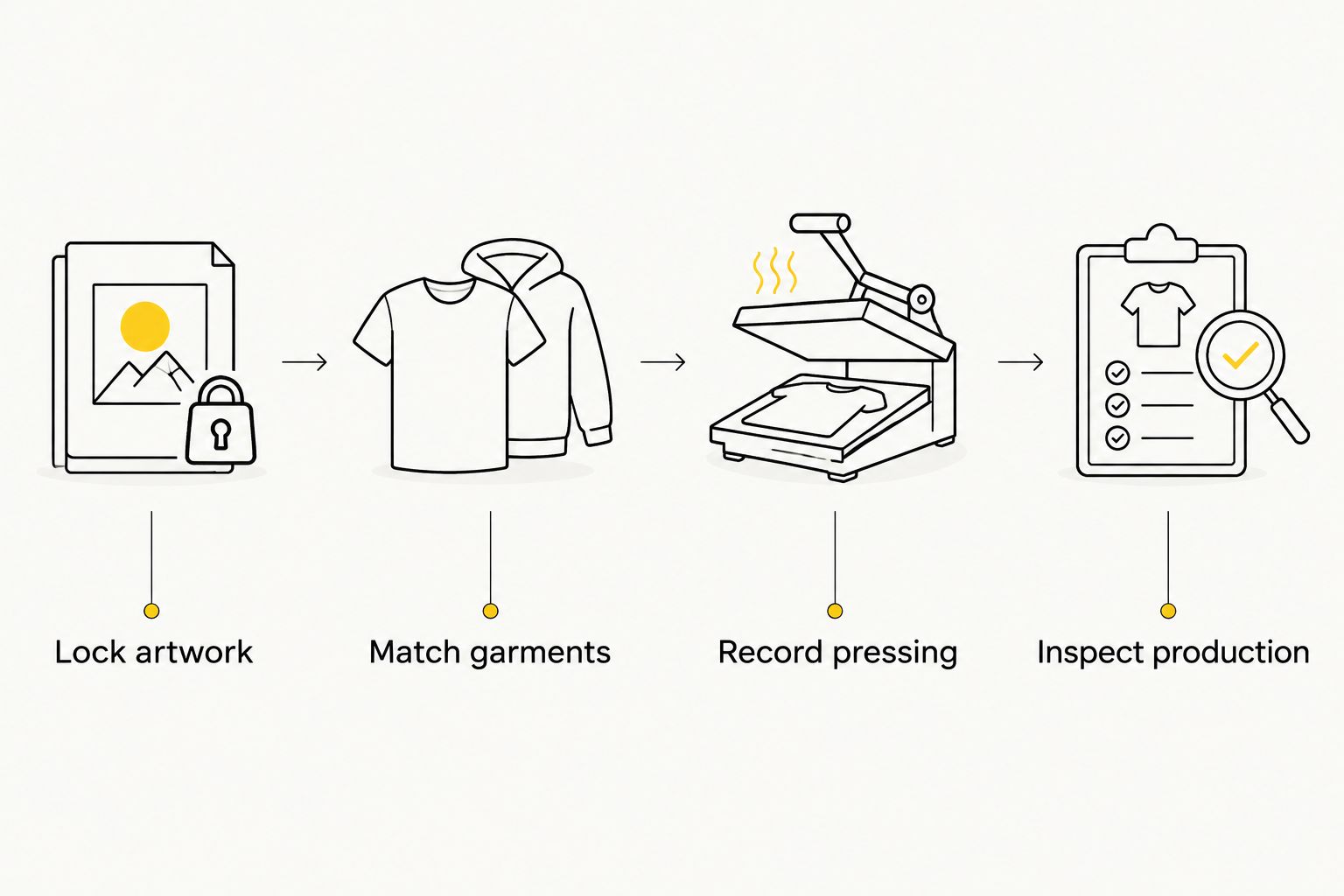
A physical reference makes this sequence useful at the press. Keep the approval garment identified and protected, and retain the order documentation alongside it.
How this ranking works
This ranking prioritizes ordering formats that fit a documented approval-to-production process. Individual transfers lead for cut-to-size purchasing; the uploader leads for prepared sheets; samples belong at the evaluation stage.
The ranking does not claim measured superiority in color drift, adhesion, wash durability, or batch rejection rates. DTF2GO ordering options serve different preparation needs, and those differences are not substitutes for production evidence.
Which DTF transfer option should you choose?
Choose PRINT & CUT DTF Transfers as the default for individual, cut-to-size production. Choose 31" DTF Gang Sheet UPLOADER when your shop already has an approved print-ready layout, or evaluate 32" DTF Gang Sheet BUILDER when a builder-based route better fits preparation.
For a new supplier evaluation in 2026, begin with DTF Transfers Samples, then qualify the actual production artwork. Do not promote a general sample into a job-specific approval without checking what changed.
FAQ
What's the best DTF transfer option for sample-to-bulk consistency?
The best option is the one that preserves your approved artwork and application process through production. PRINT & CUT DTF Transfers suits individual cut-to-size orders, while 31-inch DTF Gang Sheet UPLOADER suits prepared sheet layouts; neither format alone proves batch consistency.
Does a good DTF sample guarantee the bulk order will match?
No, a good sample does not guarantee that a bulk order will match. Approve the actual artwork on the intended garment, retain the physical reference, and compare production before releasing the full run.
Are cut-to-size DTF transfers more consistent than gang sheets?
Cut-to-size ordering does not establish greater print consistency than gang sheet ordering. The formats change preparation and handling; judge consistency by comparing the approved artwork and pressed result with production.
What should I compare between a sample and bulk DTF transfers?
Compare color, fine detail, white edges, adhesion, and hand feel on the intended garment. Keep the artwork size and application procedure consistent so the comparison addresses the same job.
Should I use my actual logo for a DTF production approval?
Yes, use your actual logo at its intended print size for production approval. An unrelated sample does not establish how your small lettering, outlines, or color relationships will reproduce.
Which DTF2GO product fits a print-ready gang sheet workflow?
31-inch DTF Gang Sheet UPLOADER fits buyers submitting a prepared gang sheet. Confirm the current file requirements and inspect the final layout before ordering.
Should I approve every garment type separately?
Evaluate each garment type included in your production order rather than extending an approval automatically. Fabric composition, garment color, and application conditions belong in the approval record.
One last thing
Keep the approved pressed garment, not just the unused transfer. Your customer receives decorated apparel, so the useful reference includes the garment, the artwork, and the application result together.
When a repeat order looks different, start with that reference and the recorded setup. Changing several settings immediately makes the source of the difference harder to identify.


