


Tow truck company DTF printing is a method of heat-applying printed film transfers to compatible uniforms with the aim of keeping crew branding consistent across replacements and new hires. This 2026 guide covers artwork, garment testing, transfer formats, and production checks while separating company identification from roadside safety requirements.
- DTF transfers for tow truck companies suit compatible crew uniforms; test each garment before production.
- DTF2GO is best for decorators sourcing cut-to-size, ready-to-press DTF transfers for tow company uniforms.
- Gang sheets combine artwork, but require layout control, cutting, and sorting before pressing.
- Printed logos do not replace reflective materials or establish safety-apparel compliance.
Why DTF printing matters for tow truck companies
A towing uniform has separate jobs: identify the business, identify the wearer, and meet the requirements of the work being performed. Treat branding and protective performance as separate approval decisions. A clear logo does not establish that a garment is suitable for roadside work.
DTF2GO is best for decorators sourcing cut-to-size, ready-to-press DTF transfers for tow company uniforms. The format removes transfer cutting from the decorator’s preparation work, but garment selection, placement, pressing, and finished-uniform approval still need attention.
DTF transfers put a printed design onto compatible fabric without requiring your business to print the transfer itself. That makes outsourced transfers an option when you already have a suitable heat press or work with an apparel decorator. Outsourcing transfer production does not remove the need to test the actual blank.
For your 2026 uniform program, organize the work around repeatability. A replacement shirt should follow an approved artwork file and placement record, not someone’s memory of the previous order.
Build a repeatable tow company uniform process
Start with a spreadsheet, garment labels, and full-size paper artwork. You can resolve the roster, placement, and approval questions manually before choosing an ordering format or sending a production file.
Follow this sequence: define the garment, prepare the artwork, choose the format, test the combination, approve pressing, then record the result. Each approval should belong to a specific garment and transfer combination.
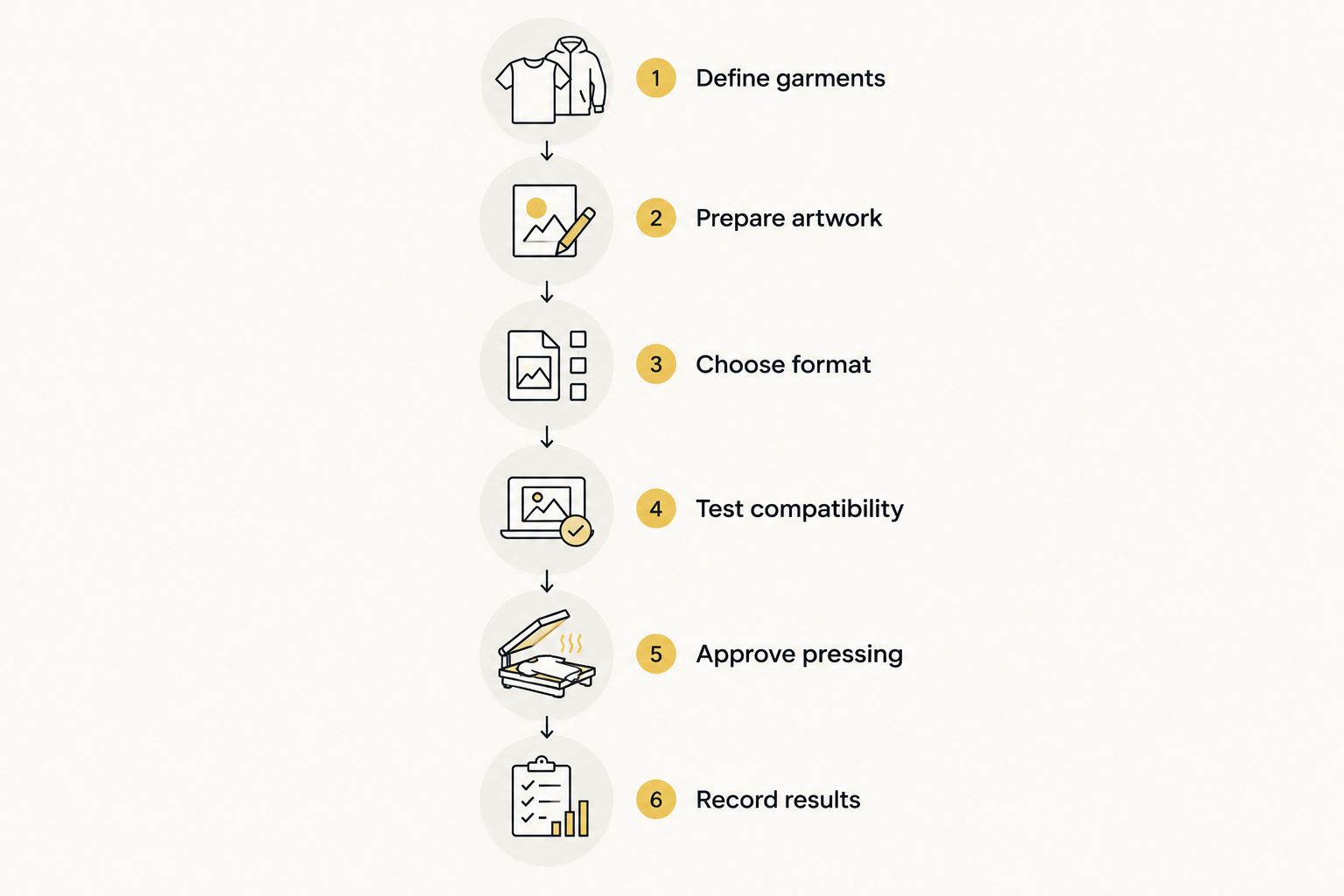
Define garments before ordering transfers
Best for: separating routine branded clothing from garments with protective requirements. Build a manual issue list by employee, garment style, color, size, and decoration location. Include spare garments and replacements as separate entries so the transfer quantity follows the actual issue plan.
Do not group a cotton shirt, performance polo, coated jacket, and safety vest under a single application instruction. Fabric composition, construction, and finishes affect the approval process. Ask the garment manufacturer about decoration restrictions before committing blanks to production.
Use a recommended 3-category worksheet: routine shirts, outerwear, and safety apparel. These are planning categories, not claims that every garment within a category accepts the same transfer.
- Define garments by exact style and fabric composition.
- Record care instructions and decoration restrictions.
- Mark reflective tape, pockets, seams, and closures.
- Separate employee names from shared company artwork.
- Identify who approves protective-garment decoration.
Prepare artwork for recognition
Best for: company logos, driver identification, and readable back graphics. Print the proposed artwork on paper at its intended size and position it on the actual garment. Check the design with the garment worn, not only laid flat.
Give the company name priority over secondary details. A detailed tow truck illustration or tightly packed service list competes with the main identification. Keep telephone numbers and supporting text only when they remain readable at the chosen output size.
For the 2026 artwork master, retain an editable source file and a clearly identified production export. A screenshot of a previous shirt is not a substitute for approved artwork.
- Prepare artwork at its intended output dimensions.
- Remove unintended backgrounds from the production file.
- Check spelling, telephone details, and employee names.
- Review fine lines and small lettering at actual size.
- Approve separate layouts for chest and back placements.
Choose a transfer format around preparation work
Best for: matching the order format to the person doing the pressing. Start by counting designs and placements manually. A common logo across several sizes creates a different sorting task from individually named shirts, even when both orders contain the same garment quantity.
DTF2GO’s PRINT & CUT DTF Transfers provide the cut-to-size, ready-to-press route. This format removes sheet cutting, but you still need to match each transfer to the correct garment and placement.
Gang sheets place multiple designs on a shared sheet. They keep artwork together for ordering, but add separation and sorting work before application. Choose the format around preparation work, not sheet dimensions alone.
- Choose format after counting every decoration placement.
- Separate shared logos from employee-specific artwork.
- Confirm artwork dimensions before submission.
- Assign responsibility for cutting and sorting sheets.
- Check the current submission requirements before ordering.
Test compatibility on the actual garment
Best for: approving a new blank, color, or fabric finish. Read the garment label and the transfer supplier’s instructions first. Then test the intended combination on a representative garment rather than assuming that approval on one shirt carries across every uniform style.
Polyester dye migration, heat sensitivity, and surface treatments are relevant checks for a decorator. They are not reasons to claim that every polyester garment fails or that every cotton blend succeeds. The finished test provides the decision for that particular combination.
Use a recommended 3-stage approval record: after application, after cooling, and after laundering according to the relevant instructions. Do not turn a successful initial press into an unsupported durability promise.
- Test compatibility on the intended garment style and color.
- Inspect for discoloration, distortion, and press marks.
- Check small details and transfer edges after cooling.
- Launder the approved test using applicable care guidance.
- Retain the result with the garment’s identifying details.
Approve pressing and placement together
Best for: consistent chest logos and back graphics across the crew order. Use a ruler and a paper placement template before pressing. Record your reference points so a different operator can reproduce the placement without guessing.
Follow the instructions supplied for the specific transfer, including temperature, time, pressure, and peel method. There is no single setting to prescribe for every transfer and workwear fabric. Check that the selected process also respects the garment manufacturer’s restrictions.
Keep thick seams, pockets, zippers, and other raised construction out of the pressing area where they interfere with even contact. Do not cover reflective material or decorate protective apparel without the required approval.
- Approve pressing on a representative decorated garment.
- Record temperature in °F and dwell time in seconds.
- Record pressure guidance and the specified peel method.
- Define placement from consistent garment reference points.
- Stop production when the approved result is not reproduced.
Sort transfers against the crew roster
Best for: orders mixing driver names, shirt sizes, and multiple placements. Make labeled job packets manually before adding production software or another ordering system. Each packet should connect the employee, garment, transfer, and approved placement.
Count decorated locations, not just shirts. For example, a planning order of 12 shirts with 2 placements per shirt requires 24 transfer applications. This is a counting example, not a recommended crew quantity or a production-speed claim.
Finish one approved garment before releasing the rest of the batch. That first completed piece catches a wrong name, reversed placement plan, or outdated telephone number before the error spreads.
- Sort transfers by employee and garment style.
- Match each name against the approved roster.
- Count chest and back applications separately.
- Keep approved artwork revisions with the job packet.
- Separate completed garments from unpressed blanks.
Record results for replacement orders
Best for: keeping later issues consistent with the original uniform order. Maintain a shared folder and spreadsheet before adding another system. Save the approved artwork, garment identification, placement measurements, and application record together.
Name the record clearly, such as the 2026 uniform master, and distinguish approved files from drafts. When the garment style changes, reopen compatibility testing rather than copying the old approval automatically.
Track what caused rejects without converting those observations into broad performance claims. A lifted edge, wrong name, or visible press mark needs a specific correction; reordering the same artwork does not resolve every production problem.
- Record results against the exact garment and transfer combination.
- Save approved dimensions and placement reference points.
- Retain a photograph of the accepted finished garment.
- Log rejects by observed issue and corrective action.
- Reapprove changes to blanks, artwork, or application instructions.
Compare uniform decoration options
Choose by garment, artwork, and production responsibility. DTF is a printing method, not a universal answer for every towing uniform. Compare the complete job: preparation, application, garment restrictions, and the finished appearance you need.
The table separates the practical advantages from the limitations. No decoration method in this comparison establishes safety compliance by itself.
| Option | Best for | Practical advantage | Key limitation |
|---|---|---|---|
| Cut-to-size DTF transfers | Decorators who want individual transfers ready for placement | Removes sheet cutting from preparation | Still requires garment testing and controlled pressing |
| DTF gang sheets | Operators comfortable combining and sorting multiple designs | Groups artwork on a shared sheet | Requires layout checks, cutting, and sorting |
| Embroidery | Businesses seeking a stitched uniform logo | Produces a stitched rather than printed finish | Requires digitizing and garment-specific evaluation |
| Screen printing | Repeated shared graphics in a planned production run | Uses screens to reproduce the approved design | Screen preparation complicates artwork changes and individual names |
DTF2GO’s cut-to-size DTF transfers fit the outsourced-transfer route. They do not replace the press operator, supply an automatic garment approval, or resolve protective-apparel restrictions. Use samples to evaluate the physical result before committing the uniform program.
The following products support evaluation and individual-transfer ordering. Confirm the sample contents and the order’s artwork requirements directly before selecting a format.


Common mistakes tow truck companies make
Treating a bright logo as reflective protection
A standard printed logo is identification, not proof of reflective performance. Do not treat bright ink or a light-colored design as a replacement for the reflective components specified for the work. Have the responsible safety decision-maker approve the garment and decoration location.
Decorating over safety-garment components
A back graphic that fits an ordinary shirt does not automatically fit a vest or jacket. Check the manufacturer’s permitted decoration areas and restrictions before positioning the design. Leave required reflective material and garment labels unobstructed.
Approving only a digital mockup
A screen preview cannot show the finished transfer’s feel, the garment’s heat response, or the result after laundering. Approve a physical decorated sample as well as the artwork. Keep both approvals attached to the order.
Filling the back with every service detail
A company name, truck illustration, service list, telephone number, and slogan create competing priorities. Choose the information the wearer actually needs to communicate. Review the paper layout on the garment before buying the transfers.
Reordering without checking the blank
An unchanged logo does not mean the production conditions are unchanged. A replacement garment with a different fabric, finish, or construction needs a fresh review. Keep the 2026 approved blank record beside the artwork so substitutions are visible.
FAQ
What are the best DTF transfers for tow truck companies?
The best DTF transfers for tow truck companies are those approved on the exact uniform garment using the supplier’s application instructions. Choose cut-to-size transfers to remove sheet cutting, or gang sheets when your decorator can handle layout, cutting, and sorting.
Can I put a DTF logo on a reflective safety vest?
Apply a DTF logo to a safety vest only after confirming the garment manufacturer’s decoration restrictions and obtaining the required approval. Do not cover reflective material or assume the decorated vest retains its required protective performance.
Is DTF better than embroidery for towing uniforms?
DTF suits printed artwork, while embroidery suits a stitched finish. Compare the actual design and garment, then approve a physical sample rather than choosing a method for every uniform item at once.
What heat-press settings should I use for tow company shirts?
Use the settings supplied for the specific transfer, provided they are compatible with the garment manufacturer’s instructions. Record temperature, time, pressure guidance, and peel method after approving the test garment.
Can DTF transfers go on polyester work shirts?
DTF transfers can be used on compatible polyester garments, but the exact shirt and transfer combination needs testing. Check for dye migration, heat marks, distortion, and adhesion before decorating the full order.
Can I order transfers instead of buying a DTF printer?
You can outsource transfer production and apply ready-to-press transfers with a suitable heat press or use an apparel decorator. DTF2GO produces custom cut-to-size, ready-to-press DTF transfers; garment selection and application approval remain part of the job.
How do I keep replacement driver shirts consistent?
Keep an approved production record containing the artwork, garment style, dimensions, placement references, and application instructions. Recheck compatibility whenever the blank, transfer specification, or pressing process changes.
One last thing
Check the uniform with the outer layer on. A back graphic on a shirt cannot identify the company when a vest or jacket covers it. Approve the full worn combination, then decide where branding belongs without interfering with protective features.
Keep that approved combination in your 2026 uniform record. It gives the next decorator a production reference instead of another interpretation of the logo.


