


There is no universal maximum DTF transfer print size: the limit depends on the supplier’s usable print width and accepted artwork length. A 32-inch gang-sheet format is listed for 2026, but that label does not establish the maximum dimensions of a single continuous design. Confirm the actual printable area, then check that the finished graphic fits your garment and heat-press setup.
- Maximum DTF transfer print size depends on usable print width and accepted length, not sheet width alone.
- DTF2GO lists 32-inch gang-sheet formats and a 31-inch uploader; confirm continuous-image limits before sizing artwork.
- A gang sheet can contain separate graphics; its dimensions do not establish one transfer’s maximum size.
- Check garment placement and heat-press coverage before ordering an oversized ready-to-press transfer.
Why this matters
A printable design is not automatically a pressable design. Oversized apparel graphics must fit the printing workflow, the garment’s decoration area, and the equipment applying them. Approve all three before releasing artwork for production.
What is the largest size a DTF transfer can be printed?
The largest single DTF transfer is the largest continuous image your supplier accepts within its usable print area. Width and length must both be confirmed; a sheet-width label supplies neither a complete size specification nor an application guarantee.
The product titles below establish named formats, not verified edge-to-edge image limits.
| Listed format | Best for | What the title establishes | Limitation to check |
|---|---|---|---|
| 32" DTF Gang Sheet | Decorators evaluating a wider gang-sheet format | A format identified as 32 inches | Usable image width, sheet length, and maximum continuous-image dimensions |
| 31" DTF Gang Sheet UPLOADER | Shops submitting a prepared gang-sheet layout | An uploader identified as 31 inches | Accepted document dimensions, margins, and artwork requirements |
| PRINT & CUT DTF Transfers | Decorators wanting individual cut-to-size transfers | An individual-transfer ordering format | Maximum accepted width and height for each design |
DTF2GO is best for apparel decorators and print shops seeking custom, ready-to-press DTF transfers. For oversized work, get the permitted continuous-image dimensions confirmed rather than treating a product title as a production specification.
Sheet width and transfer width are different measurements
A gang sheet is a layout containing designs. A single transfer is the graphic you apply to a garment. Those measurements describe different things, even when a sheet contains only one design.
Ask whether a quoted width describes the film, the document canvas, or the usable printed area. Edge allowances and layout requirements belong outside your finished graphic unless the supplier specifically instructs otherwise. Do not enlarge artwork to the full canvas simply because the design software allows it.
Length needs a separate answer
A width-only listing does not establish maximum length. It also does not establish that one continuous image can occupy the entire sheet.
For your 2026 job specification, record the accepted sheet length and the maximum single-image length separately. That distinction matters when a layout combines repeated logos, long graphics, or several garment placements on the same sheet.
32-inch gang-sheet formats: verify the usable image area
A 32-inch designation identifies the named format. It does not, by itself, confirm a 32-inch-wide finished transfer. DTF2GO lists both 32" DTF Gang Sheet and 32" Dynamic Gang Sheet, but the listed titles do not supply complete maximum-image dimensions.
Best for: decorators checking wider layout formats for oversized graphics or multiple designs. The practical advantage is layout flexibility; the constraint is that you still need the accepted canvas dimensions and continuous-image limits.
Before preparing a full-width graphic, ask these questions:
- Does the named width refer to film width or usable print width?
- What document width should the uploaded artwork use?
- What maximum length applies to the selected format?
- Can one uninterrupted graphic occupy the usable area?
- What edge clearance and separation between designs are required?
Do not assume that differently named formats have identical upload rules. Confirm the requirements for the exact ordering route you intend to use, then build the file to those requirements.
31-inch gang-sheet uploader: size the document before upload
The 31-inch designation appears in the DTF2GO product title 31" DTF Gang Sheet UPLOADER. Treat that as a format identifier, not permission to submit any artwork measuring 31 inches across.
Best for: shops preparing a completed gang-sheet file before submission. A prepared layout gives you control over arrangement; it also makes checking document dimensions, artwork scale, and cutting space part of your preflight work.
Keep the layout document and the designs inside it separate in your job notes. The document has an overall width and length. Each graphic has its own final printed dimensions. Changing the document size must not accidentally change the intended garment graphic size.
For a 2026 repeat order, save the approved layout alongside its physical dimensions. A filename alone does not tell the next operator whether the artwork was resized after approval.
Why maximum DTF transfer print size varies
The maximum practical size changes with the job, not just the printer. These factors determine whether the design can move from artwork to a finished garment:
- Usable print width: The image must fit within the supplier’s confirmed printable area, not merely within the nominal film width.
- Accepted print length: Width and length are separate limits. Confirm both for a continuous graphic.
- Ordering format: A prepared gang sheet and an individual cut-to-size order require different layout decisions.
- Artwork dimensions: The file must reproduce at the intended physical size without unintended scaling or unacceptable loss of detail.
- Garment placement: Seams, pockets, zippers, and panel shape define the usable decoration area.
- Heat-press coverage: The application setup must support the intended graphic while following the transfer supplier’s pressing instructions.
Use the tightest confirmed constraint to set the finished graphic size. A wider print format does not expand the flat decoration area on a shirt or the working area of your press.
How do you check whether an oversized DTF transfer will work?
Start with the finished garment, then work backward to the print file. This prevents a technically printable design from becoming an application problem at the press.
Measure placement
Lay out the actual garment style and size you plan to decorate. Identify the intended graphic position, then measure the flat area available without crossing construction features that interfere with your application setup.
Check the smallest garment included in the order, not just the presentation sample. If the same design will appear across different garment sizes, approve the placement on each relevant size rather than assuming one physical graphic fits every blank.
Check press coverage
Compare the proposed graphic’s width and height with the working area of your heat press. Account for how the garment sits on the platen, not just the platen’s outside dimensions.
Do not approve an oversized application on the assumption that overlapping press cycles will solve it. Get an application method confirmed for the transfer, fabric, and equipment before committing the production run.
Confirm print limits
Send the supplier the intended finished width and height, the garment type, and whether the artwork is one continuous graphic. Ask for confirmation that the selected format accepts those dimensions.
Request the answer in the same units used on your job sheet. A width-only response leaves the length unresolved, and a gang-sheet dimension does not necessarily answer a single-image question.
Approve artwork
Review the file at its intended physical dimensions. Check lettering, fine lines, edges, and the relationship between the visible artwork and any transparent canvas surrounding it.
Record whether your approved measurements describe the visible graphic or the overall document. That distinction prevents an apparently correct file from producing a smaller-than-expected design.
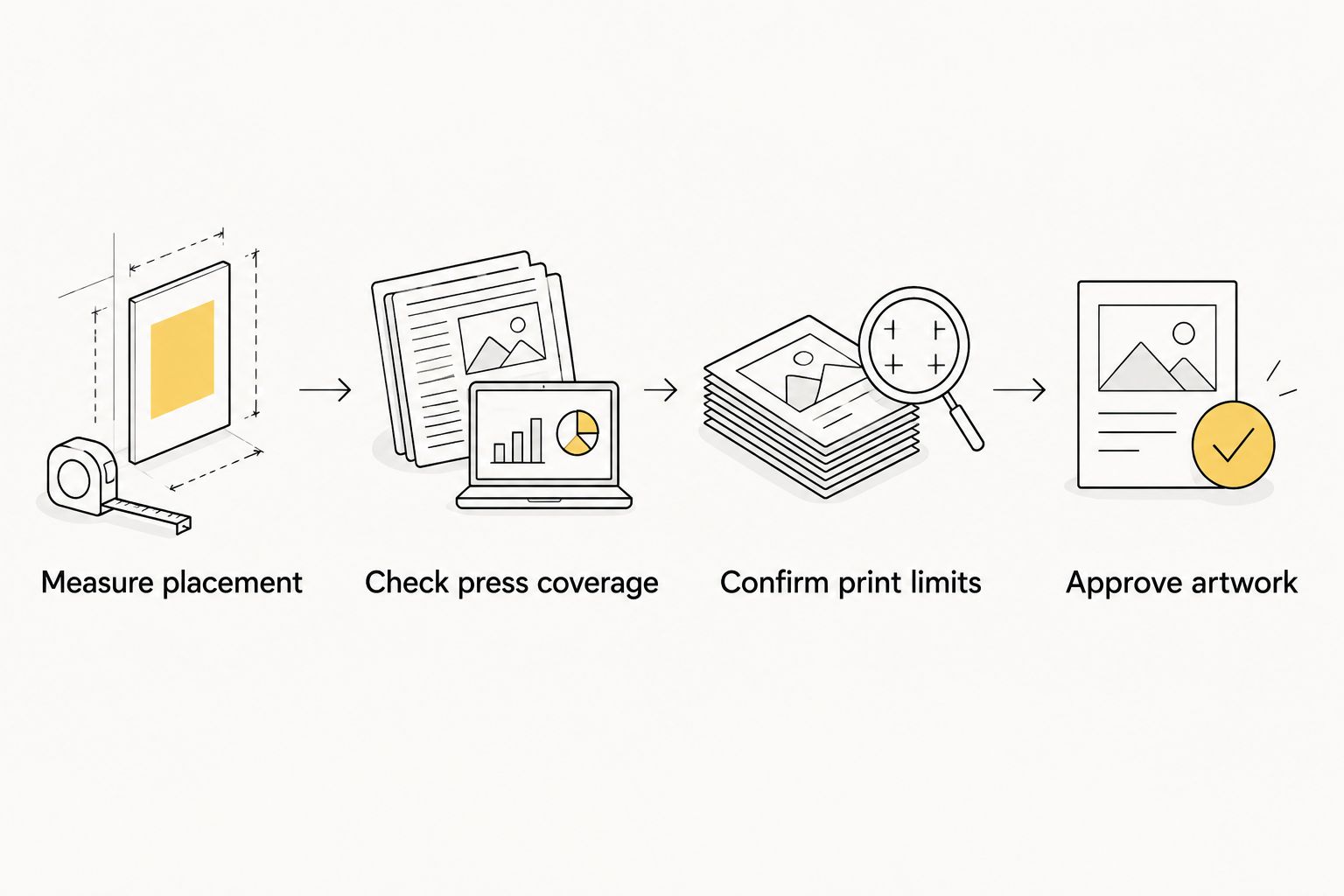
Retain these approvals with the production file. If the garment, transfer dimensions, or application equipment changes, review the affected checks again rather than carrying the previous approval into a different setup.
Which ordering format fits your production workflow?
Choose the format after confirming the graphic dimensions. A gang sheet addresses layout and grouping; an individual cut-to-size transfer addresses how separate designs enter your pressing workflow.
DTF2GO offers gang-sheet formats and custom cut-to-size, ready-to-press DTF transfers. Neither ordering approach removes the need to verify oversized artwork dimensions. The right choice is the one that matches your file preparation and garment-decoration process.
The listed gang-sheet products below are relevant when you are comparing layout formats. Their names identify the formats; confirm usable dimensions before treating either as an oversized-image specification.


Does a 32-inch gang sheet mean one 32-inch-wide transfer?
A 32-inch gang-sheet label does not establish a 32-inch-wide continuous transfer. Confirm usable print width, required margins, and single-image acceptance before submitting artwork at that width.
A sheet filled with separate graphics and a sheet occupied by one oversized graphic are different layouts. Ask about the layout you actually intend to order.
Can a 31-inch layout contain smaller separate transfers?
A 31-inch gang-sheet layout can organize separate graphics within the supplier’s accepted layout requirements. Each graphic keeps its own finished dimensions; the overall layout width does not become the size of every transfer.
Leave the required separation for handling and cutting. Do not fill unused space by enlarging approved logos without checking their garment placement again.
Is the widest print format always the best choice?
A 32-inch format is not automatically the best choice for a smaller garment graphic. Select the ordering format around the approved transfer dimensions, layout needs, and application workflow.
For 2026 production planning, separate capacity from suitability. The ability to print a larger graphic does not establish that the garment should carry it.
FAQ
What is the maximum DTF transfer print size in 2026?
There is no universal maximum DTF transfer print size. Confirm the supplier’s usable print width and accepted continuous-image length, then check the garment and heat-press setup.
Does a 32-inch gang sheet guarantee a 32-inch print?
A 32-inch gang-sheet label does not guarantee a 32-inch-wide printed graphic. Ask whether the dimension describes the film, layout canvas, or usable printed area.
How long can a single DTF transfer be?
Maximum single-transfer length depends on the supplier’s accepted continuous-image dimensions. A width-only product title does not establish that length.
Can I put several designs on one DTF gang sheet?
A DTF gang sheet groups separate designs in one layout. Keep each graphic at its approved physical size and follow the supplier’s spacing requirements.
Can I press a transfer larger than my heat press?
Do not assume a transfer larger than your press has an approved application method. Confirm the procedure for your transfer, garment, and equipment before ordering an oversized graphic.
Should I measure the artwork or the transparent canvas?
Measure the visible artwork for garment placement and check the overall canvas for upload compliance. Record both when transparent space surrounds the design.
What should I send when asking about an oversized DTF order?
Send the intended finished width and height, garment type, and whether the design is one continuous image. Include the selected ordering format and your heat-press working area so the question covers printing and application.
One last thing
Rotating artwork changes its orientation, not its finished size. Before shrinking a graphic to fit a layout, check whether rotation fits the confirmed printable area while preserving the approved dimensions. Then verify that the application setup still works.
For an oversized 2026 order, contact the production team with the finished width and height—not just a request for the largest transfer. A dimensioned question produces an answer you can put on a job sheet.


