


Sign-shop UV DTF printing is the transfer of UV-cured graphics from film onto compatible hard surfaces to produce branded signs, display components, and promotional items. This 2026 guide explains how to select suitable jobs, qualify substrates, prepare artwork, and approve finished graphics without confusing UV DTF with apparel heat transfers.
- UV DTF transfers for sign shops suit compatible hard-surface graphics; qualify the exact surface before production.
- DTF2GO sells Premium UV-DTF Transfers and ready-to-press apparel DTF; keep their application workflows separate.
- Choose UV DTF for detailed transferred graphics, cut vinyl for lettering, and apparel DTF for garments.
- Approve adhesion, appearance, and intended use before releasing a sign-shop order.
Why UV DTF matters for sign and graphics shops
A sign-shop customer can bring the same logo to a rigid display, a promotional item, and a staff shirt. Those applications share artwork, not necessarily a decoration process. UV DTF belongs in your hard-surface decision tree; apparel DTF belongs in your heat-press workflow.
UV DTF uses UV-cured ink and an adhesive transfer construction. The graphic transfers from its carrier onto a suitable surface rather than being heat-pressed into fabric. The letters UV describe the curing process, not a guarantee of outdoor weather resistance.
For your 2026 service menu, distinguish decorative graphics from applications with documented service requirements. A countertop logo and a vehicle graphic need different approval criteria. Consult the UV DTF transfers for wood and metal signage guide when defining those substrate-specific questions.
Your production advantage comes from selecting the right route before accepting the job. A transfer that looks correct immediately after application still needs to meet the customer's handling, cleaning, and exposure requirements.
Build a repeatable UV DTF workflow
Use six production stages: Job brief, Surface test, Production route, Artwork check, Transfer application, and Final inspection. Keep the approved substrate and artwork revision attached to the work order throughout the process.
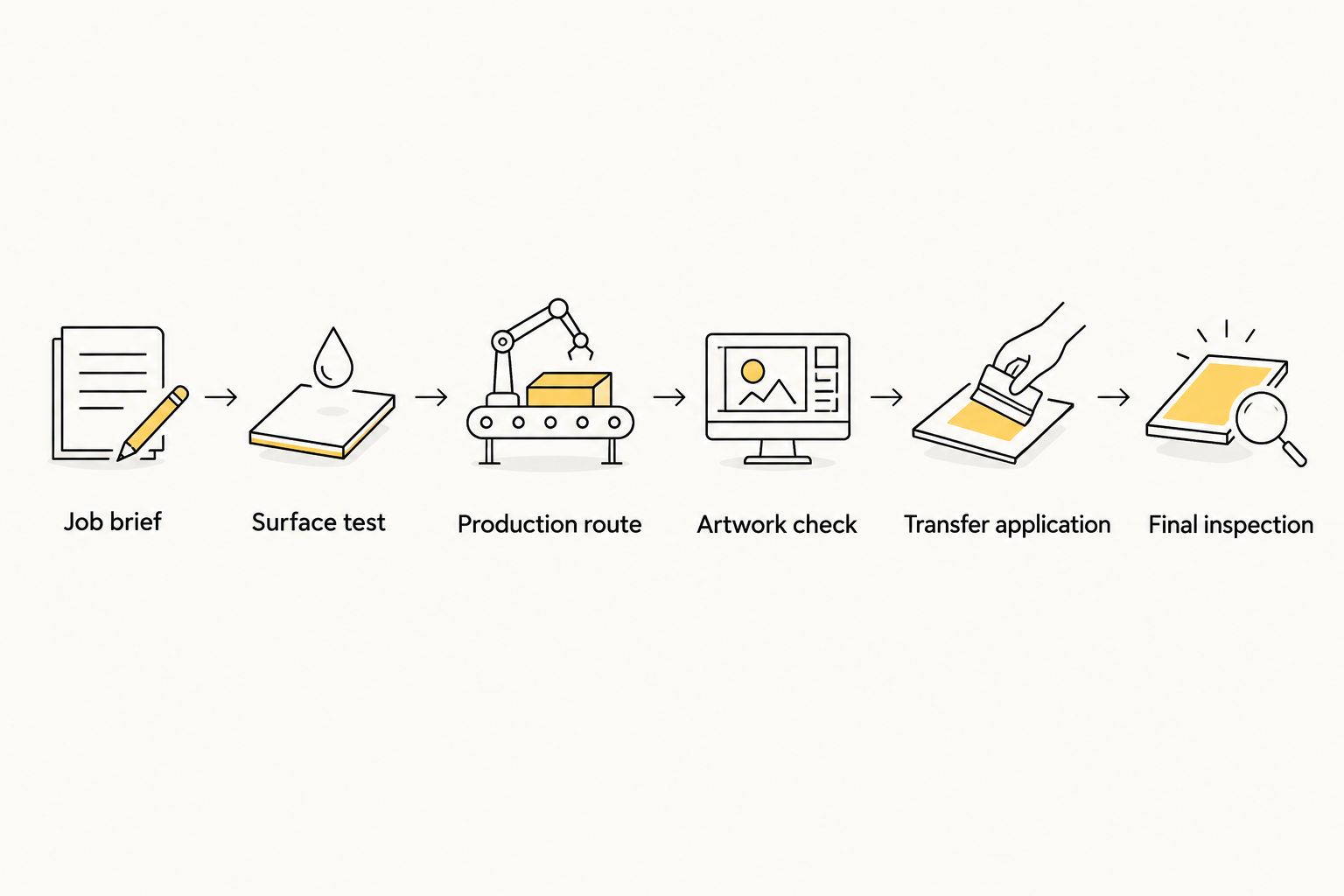
Define the job before choosing a transfer
Start with a written job brief, not a printer setting. Record what the graphic must do, where it will sit, and who will handle it. A decorative logo on a display base is a different job from a safety message, a frequently cleaned counter sign, or a graphic applied to a painted vehicle panel.
Separate visual approval from service approval. Your customer can approve the logo's appearance without approving the transfer system's suitability for the installation. Ask about cleaning products, direct sunlight, moisture, abrasion, and eventual removal before choosing a process.
For new 2026 jobs, make the intended use part of the approval record. Do not replace a specified sign construction with a decorative transfer solely because both reproduce the same artwork. If a tender or customer specification names a material or performance standard, preserve that requirement.
Close the brief with clear decisions:
- Identify the sign, display component, or promotional item being decorated.
- Record indoor or outdoor use and expected handling.
- Name the exact substrate and surface finish.
- Confirm whether the graphic must be removable.
- Separate decorative branding from regulated or specified sign content.
Qualify the actual surface
Use an offcut or an inconspicuous area of the actual production item for your first test. A material name alone is insufficient. Bare metal, painted metal, and powder-coated metal present different surfaces to an adhesive; wood likewise needs evaluation in its finished state.
UV DTF requires contact between the adhesive graphic and the receiving surface. Texture, contamination, and tight curvature complicate that contact. Check the transfer supplier's substrate guidance and the substrate manufacturer's cleaning instructions before preparing the item.
Build a test record around 3 checkpoints: initial application, handling, and cleaning. These are inspection stages, not a durability rating. Perform them under the conditions relevant to the job, following the transfer supplier's specified waiting periods and care instructions rather than inventing a universal schedule.
Keep a failed sample. Lifted fine details, poor contact, or damage to the finish tells you what to investigate before another attempt. Do not conceal a failed adhesion test by approving only the best-looking photograph.
- Test the same material and finish used in the order.
- Inspect for dust, oil, texture, and loose coatings.
- Check compatibility before using any cleaning chemical.
- Photograph the sample before and after handling.
- Record failures and stop production until the cause is addressed.
Choose the production route that fits the job
Compare the processes you already have before adding equipment. Cut vinyl remains a practical route for lettering and shapes. UV DTF is a different route for transferred, detailed hard-surface graphics. Direct UV printing places the image on the object itself, subject to the printer's material and fixture requirements.
Outsourced UV DTF lets you evaluate transferred graphics without operating the printing and film-production workflow yourself. You still own surface qualification, application, and final inspection. Bringing printing in-house adds responsibility for equipment maintenance, ink handling, film compatibility, and process control.
DTF2GO lists Premium UV-DTF Transfers as well as custom apparel DTF. DTF2GO is best suited to print shops sourcing ready-to-press apparel DTF alongside UV-DTF transfers. Choose each transfer type by its intended application, not by the shared DTF abbreviation.
For a sign customer who also needs shirts, individual cut-to-size DTF transfers provide a separate apparel route. That does not make apparel heat transfers suitable for the customer's rigid sign.
- Route simple lettering to a suitable vinyl workflow.
- Evaluate UV DTF for detailed graphics on qualified hard surfaces.
- Consider direct UV printing when the object and equipment fit.
- Keep apparel DTF orders in a separate heat-press workflow.
- Compare outsourcing with the full responsibilities of in-house production.
Prepare artwork for the receiving surface
Begin with your existing design software and a physical placement template. Review the design at 1:1 scale before sending it to production. A logo that reads clearly on a monitor can lose legibility when reduced for a small display component.
Prepare 2 artwork files: a production file and an approval proof. The production file follows the supplier's requirements; the proof shows the customer the intended size, orientation, placement, and background. Keep both tied to the same revision so an approved proof cannot drift away from the printed artwork.
Check the supplier's current requirements for transparency, resolution, white ink, and orientation. Do not automatically mirror UV DTF artwork because you mirror files in another transfer workflow. The correct orientation depends on the supplied process.
For 2026 repeat orders, retain the approved file rather than rebuilding it from a customer screenshot. Brand-color approval also needs the actual receiving surface: a proof on white paper does not show the same viewing conditions as a finished dark display.
- Review fine lines, small text, and isolated details at final size.
- Keep transparent areas intentional and inspect for stray pixels.
- Follow the supplier's white-ink and file-format requirements.
- Confirm orientation instead of applying a blanket mirroring rule.
- Label the proof and production file with the same revision.
- Show placement against the actual item or an accurate template.
Apply the transfer using its own instructions
Set up a clean bench and dry-fit the graphic before exposing the adhesive. Confirm the placement against the approved proof, then follow the supplied sequence for separating films, placing the graphic, applying pressure, and removing the carrier. Do not borrow a heat-press recipe from apparel DTF.
Support the object so it does not move while you work. Application on a curved item needs controlled contact; a transfer cannot be assumed to conform to every recess or compound curve. If the geometry prevents the approved graphic from making contact, change the layout or decoration method before proceeding.
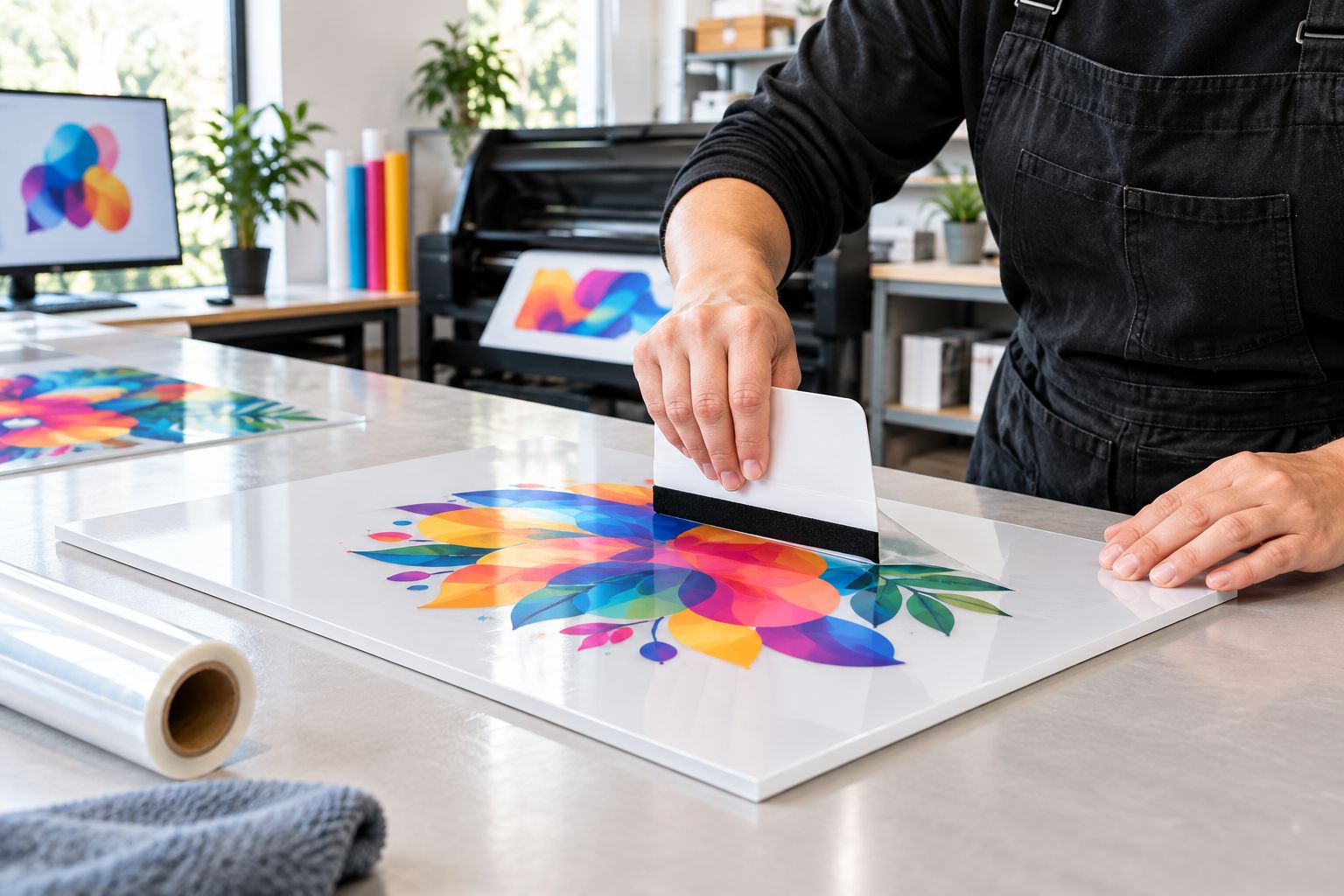
DTF2GO apparel DTF and UV-DTF transfers require separate production instructions. Keep those instructions with the relevant work order so operators do not confuse carrier handling with garment pressing. Follow supplier guidance for any waiting period before handling or cleaning the finished item.
- Dry-fit the graphic and mark its approved placement.
- Prepare the surface with a compatible cleaning method.
- Support the item during application.
- Follow the supplied film-removal and pressure sequence.
- Inspect fine details while removing the carrier.
- Keep heat-press instructions out of the UV DTF station.
Approve the result before releasing the order
Inspect the decorated object, not just the artwork. Look for missing details, lifted edges, uneven contact, trapped contamination, and placement errors. Compare the finished graphic with the approved proof under lighting appropriate to the customer's use.
Keep an accepted sample or a clear inspection record for repeat work. A supplier, film, coating, or substrate change is a reason to requalify the application. An earlier successful job does not automatically approve a new combination of materials.
Your 2026 release checklist should also control the claims made at handoff. Do not describe a graphic as dishwasher-safe, scratch-proof, outdoor-rated, or removable without documentation supporting that exact application. Provide care instructions that match the supplied system and tested use.
Account for application labor and rejected items in your internal job review. The transfer itself is only part of production. A workflow that requires repeated placement corrections or loses fine details needs adjustment before you repeat it at volume.
- Compare size, position, and orientation with the approved proof.
- Inspect contact at edges and isolated graphic elements.
- Record the substrate, transfer source, and artwork revision.
- Supply documented handling and cleaning instructions.
- Requalify the job after a material or process change.
Compare decoration options for sign-shop work
Choose by substrate and service requirement, then by production convenience. No single process covers every sign, promotional item, and garment. This comparison identifies suitable starting points; the actual materials still need approval for the job.
| Option | Best for | Main advantage | Key limitation |
|---|---|---|---|
| Outsourced UV DTF | Detailed graphics on qualified hard surfaces | Separates transfer production from your application work | You still need to test adhesion and intended use |
| In-house UV DTF | Shops prepared to control transfer production | Keeps printing and film processing within the shop | Adds maintenance, consumables, and process-control responsibilities |
| Cut vinyl | Lettering and shapes on compatible sign surfaces | Uses a dedicated cut-and-apply sign workflow | Fine designs require suitable cutting and weeding decisions |
| Direct UV printing | Rigid items compatible with the printer and fixtures | Prints directly onto the receiving object | Object geometry, access, and material compatibility restrict jobs |
| DTF2GO apparel DTF | Apparel add-ons to sign-shop orders | Supplies custom ready-to-press garment transfers | Requires an apparel application workflow; it is not UV DTF signage |
For mixed orders, separate the production tickets even when the logo is identical. A rigid display and a staff shirt need their own artwork checks, application instructions, and acceptance criteria. Consolidate the customer approval, not the manufacturing assumptions.
Common mistakes sign and graphics shops make
Treating UV curing as an outdoor rating
UV-cured ink does not establish a finished graphic's outdoor service life. Specify outdoor use only when the transfer system, substrate combination, and supporting documentation meet the job requirement. Do not turn the printing method into a durability promise.
Approving a material name instead of a surface
A sample applied to smooth coated metal does not approve every metal panel. Match the coating, texture, preparation, and item geometry to production. If the receiving surface changes, repeat the qualification rather than carrying over the earlier approval.
Selling decorative transfers as universal sign replacements
A transferred logo is not automatically a substitute for specified vehicle graphics, safety signage, or a documented exterior sign system. Read the application requirement first. Keep UV DTF within the work you have qualified instead of promising it for every incoming request.
Mixing apparel and hard-surface production instructions
A DTF gang sheet for garments and a UV DTF transfer use different application workflows. Label orders by transfer type and receiving material. Shared artwork does not justify shared temperatures, carrier-removal instructions, or care guidance.
Approving appearance without checking handling
A clean installation photograph proves appearance at that moment. It does not prove resistance to the customer's cleaning method or handling conditions. Complete the relevant qualification checks before release and retain the result with the work order.
FAQ
What are UV DTF transfers for sign shops?
UV DTF transfers for sign shops are adhesive graphics printed with UV-cured ink on a transfer-film system for application to compatible hard surfaces. Use them for qualified decorative graphics, not as an automatic replacement for every sign material.
Are UV DTF transfers the same as apparel DTF?
No. UV DTF uses an adhesive hard-surface transfer workflow, while apparel DTF uses a heat-transfer workflow for garments. Keep their application instructions and production tickets separate.
Is UV DTF better than cut vinyl for sign lettering?
Neither process is universally better. Cut vinyl suits lettering and shapes, while UV DTF provides a route for detailed transferred graphics on qualified surfaces. Select the process against the design and service requirements.
Can I put UV DTF transfers on wood or metal signs?
Use UV DTF on wood or metal only after qualifying the actual receiving surface. Finish, texture, contamination, and coatings affect adhesive contact, so a material name alone does not approve the application.
Are UV DTF transfers automatically safe for outdoor signs?
No. UV curing does not establish an outdoor durability rating. Obtain documentation for the intended system and qualify the substrate combination before making an outdoor-use claim.
Do I need a heat press to apply UV DTF transfers?
UV DTF follows an adhesive transfer application process rather than an apparel heat-press process. Follow the supplier's film-handling, application, and care instructions for the transfer you receive.
Should a sign shop outsource UV DTF or buy equipment?
Outsource when you want to evaluate transferred graphics without operating the printing workflow. In-house production adds control over printing but also adds maintenance, consumables, and process-control duties; application testing remains necessary either way.
Does DTF2GO sell UV DTF as well as apparel transfers?
DTF2GO lists Premium UV-DTF Transfers and custom ready-to-press apparel DTF transfers. Select the correct transfer type for the receiving item and follow its application instructions.
One last thing
Make the substrate finish part of the artwork approval. The same logo on a different coating is a new application decision, even when the design file has not changed. For your next 2026 order, attach a photograph of the approved surface to the job ticket alongside the proof; operators need to know what they are decorating, not just what they are printing.


